mirror of
https://github.com/D-Modem/login.git
synced 2026-11-28 20:38:06 -08:00
 Claude
58ffd61645
As bbs config got in D-Modem/bbs#57:

- Every section and key has a description of what it does for the
  sysop (setupdesc.go); TestEverySettingDescribed keeps one for each
  key the sample has.  F1 adds the sample's notes and the choices.
- Keys are picked from lists with a note per value: closed lists (mode,
  tty, after, charset, driver, hash...), suggestions with "Type another
  value…", and checkboxes for lists of several (auth, [menu] items,
  dropfile, users, groups, aol networks, ppp_pool dns).  The values come
  from the file and the machine: the items, the users file, [groups],
  /etc/passwd and /etc/group, resolv.conf, the sockets in /run.
- An item's key list says which letters are free and which are taken by
  another item or the hangup; listen addresses say when the other
  section uses them.
- "Add a menu item" starts from one of the sample's items (or an empty
  one), with a free key if the sample's is taken.
- tui.ChooseMulti: a list of checkboxes.
- The sample gains [number] deny and [sql] timeout, which the code read.

Co-Authored-By: Claude Opus 5.5 <noreply@anthropic.com>
Claude-Session: https://claude.ai/code/session_01B82eRVGabTrMWBpbnD6HKF
112 lines
5.4 KiB
Markdown
112 lines
5.4 KiB
Markdown
# The sysop's setup
|
|
|
|
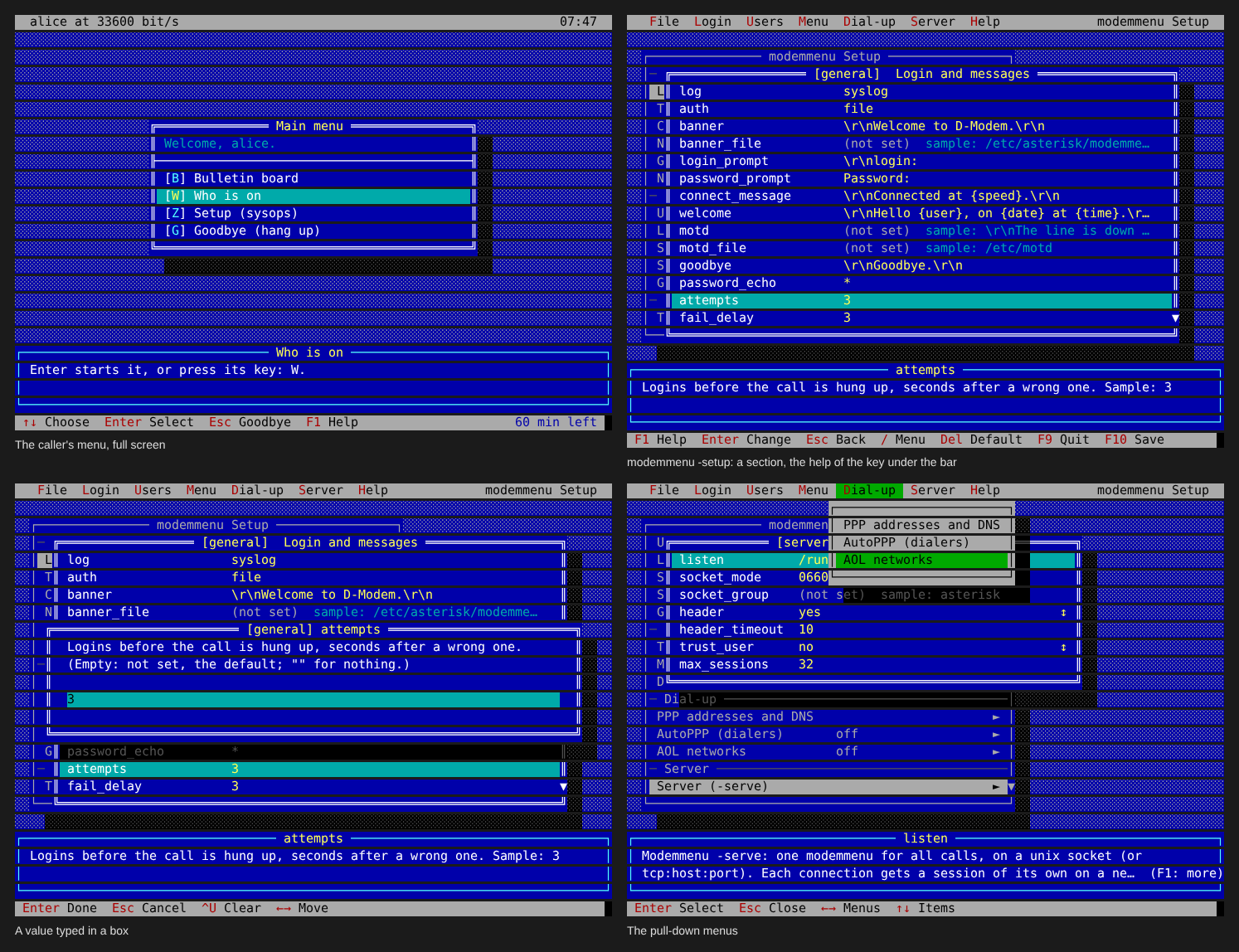
`modemmenu -setup` changes `modemmenu.conf` on a full screen, as the BBS
|
|
setup programs of the 1990s did: a menu bar of pull-down menus, a blue
|
|
desk, a window for each section cascading over the one it was opened
|
|
from, the help of the line under the bar in a box below, and the keys on
|
|
a bar at the foot.
|
|
|
|
|
|
|
|
```
|
|
modemmenu -setup -config /etc/asterisk/modemmenu.conf
|
|
```
|
|
|
|
- The first window has every section, under Login, Users, Menu,
|
|
Dial-up and Server (the same as the bar's menus). Enter opens one: its
|
|
keys and their values, `(not set)` and the sample's value for those the
|
|
file leaves out.
|
|
- Every section and key has a line under the bar saying what it does,
|
|
written for the sysop; **F1** adds the sample's own notes and the values
|
|
it can be picked from.
|
|
- **Enter** changes the value under the bar: typed in a box (cursor keys,
|
|
Home, End, Del, ^U), or picked from a list (a `↕` at the right of the
|
|
line). **Space** steps through the choices; **Del** takes the key out
|
|
(its default again). An empty box is "not set"; type `""` for an empty
|
|
value.
|
|
- `[item NAME]` and `[number NAME]` are lists: add one, open it, rename
|
|
it or delete it. An item renamed or deleted is renamed or taken out of
|
|
`[menu] items` too. `[groups]` takes groups of the sysop's own names.
|
|
- **Add a menu item** starts from one of the sample's items (the BBS by
|
|
rlogin or by handoff, PPP, change password, last callers, a door, a
|
|
shell, ZMODEM...) or an empty one. Its keys are filled in, it goes on
|
|
`[menu] items`, and when the sample's key is taken by another item it
|
|
gets a free one.
|
|
|
|
### Values picked from what there is
|
|
|
|
Most keys are picked from a list rather than typed, each value with a
|
|
note of what it is. Some lists are the only values a key takes (`mode`,
|
|
`tty`, `after`, `charset`, `petscii`, `driver`, `hash`, `emulation`,
|
|
`comm_type`, `fullscreen`, `password_change`, every `yes`/`no`); the
|
|
rest are suggestions, with "Type another value…" for one's own. Lists of
|
|
several values have checkboxes (Space checks one, Enter is done):
|
|
|
|
| Key | Offered |
|
|
|---|---|
|
|
| `[general] auth` | file, ldap, sql, system, checked in the order they are asked |
|
|
| `[menu] items` | each `[item]` with its label and mode, in the menu's order |
|
|
| `[item] key` | the letters of the item's name and label, each "free" or "taken by [item x]" / "the hangup" |
|
|
| `[item] users`, `[number] user` | the users file's users |
|
|
| `[item] groups`, `[system] groups` | `[groups]`' groups with their members, and the system's groups |
|
|
| `[item] run_as`, `[authd] allow_users` | `{user}`, and the system's login accounts |
|
|
| `[item] dropfile` | door32.sys, door.sys, dorinfo1.def, dorinfo#.def |
|
|
| `[item] path` | the sockets in /run/modemmenu and /run/bbs |
|
|
| `[autoppp] item`, `[number] item` | the menu's items |
|
|
| `[server]`/`[authd] listen` | the usual socket, marked "taken by" when the other uses it |
|
|
| `socket_group`, `socket_mode` | the system's groups; 0660, 0600, 0666 |
|
|
| `[ppp_pool] dns` | this server's PPP address, resolv.conf's servers, Cloudflare, Google, Quad9 |
|
|
| `[aol] networks` | aolnet, sprintnet, tymnet, p3 |
|
|
| time limits, `time_warning`, `min_baud`, `rate`, `security`, `log`... | common values |
|
|
|
|
- **F1** shows the whole help of the line, **/** (or F12, or Alt and a
|
|
letter) the menus, **Esc** goes back a window, **F10** saves, **F9**
|
|
quits (asking to save what changed). `^L` draws the screen again.
|
|
- The descriptions are built into the program; the sample's notes are
|
|
those of the [reference](reference.md).
|
|
|
|
Saving checks the file first, as `modemmenu -check` does; a file that
|
|
does not check is saved only when asked again ("Save anyway"). The file
|
|
keeps its comments, blank lines and order: a changed key is changed on
|
|
its own line (a comment after it kept), a new key goes after the last of
|
|
its section, a new section at the end. The file is written beside the
|
|
old one and renamed over it, its mode and owner kept. Each call reads
|
|
the file anew, so the next call has the changes; `[server]` is read when
|
|
`modemmenu -serve` starts.
|
|
|
|
With no file yet, the setup starts from the sample and saves it there.
|
|
|
|
## On the line
|
|
|
|
A sysop who calls in can have the setup on the menu, as an item of
|
|
`mode = setup`:
|
|
|
|
```ini
|
|
[item setup]
|
|
key = Z
|
|
label = Setup
|
|
mode = setup
|
|
groups = sysops
|
|
```
|
|
|
|
It must have `users` or `groups` (modemmenu refuses one without), and is
|
|
never a guest's. It needs an ANSI terminal of 40x14 at least (80x24 is
|
|
better); others are told so. The idle timeout does not hold in it: the
|
|
setup waits for the sysop however long they take. The call's time limit
|
|
(`time_limit`) still does, and what was not saved when the call ends is
|
|
lost. The file is
|
|
written as the user modemmenu runs as, which must be able to write it.
|
|
|
|
## Terminals
|
|
|
|
The screens are drawn in UTF-8 where the terminal shows it, in code page
|
|
437 for SyncTERM and the ANSI terminals of BBSs, in a VT's line-drawing
|
|
set (`ESC ( 0`) for a VT or xterm without UTF-8, and in ASCII when told
|
|
(`[terminal] charset`). A DEC terminal itself (no colors) gets bold and
|
|
reverse for the colors. Only the cells that change are sent: moving
|
|
the bar costs a hundred bytes or two. At the console, `-setup` takes
|
|
UTF-8 from the locale (`LANG`), else the VT set for `TERM=vt*` or
|
|
`xterm*`, code page 437 for `TERM=linux` or `ansi`.
|
|
|
|
**See also:** [Configuration](configuration.md#the-full-screen-menu)
|