mirror of
https://github.com/D-Modem/login.git
synced 2026-11-28 12:28:07 -08:00
Merge pull request #21 from D-Modem/claude/project-thread-fur9m9
docs: rewrite the documentation in Simplified Technical English
This commit is contained in:


15 files changed
+1154
-790
No files matched your search
+15
-8
@@ -1,7 +1,10 @@
|
||||
# Contributing
|
||||
|
||||
Contributions are welcome: issues, fixes and features alike. Before
|
||||
sending a change, run `make test` (see [docs/testing.md](docs/testing.md)).
|
||||
We accept contributions: issues, fixes and new features. Before you send
|
||||
a change, run `make test` (refer to [docs/testing.md](docs/testing.md)).
|
||||
|
||||
Write all technical documentation in ASD-STE100 Simplified Technical
|
||||
English. Follow [docs/STYLE.md](docs/STYLE.md).
|
||||
|
||||
## The contributor agreement
|
||||
|
||||
@@ -50,9 +53,13 @@ does it):
|
||||
It says that you agree to the above for that commit. A contribution
|
||||
without it cannot be merged.
|
||||
|
||||
A check on each pull request looks for that line, with the commit
|
||||
author's email, on every commit. If it's missing, `git rebase --signoff
|
||||
main` (or `git commit --amend -s` for the last commit) adds it; then
|
||||
force-push. Pull requests from the D-Modem Authors themselves (the
|
||||
repository's owner and the D-Modem organization's members) are not
|
||||
checked.
|
||||
A check on each pull request looks for that line on every commit. The
|
||||
line must have the email address of the commit author. If the line is
|
||||
missing, do these steps:
|
||||
|
||||
1. Add the line with `git rebase --signoff main`. For the last commit
|
||||
only, you can use `git commit --amend -s`.
|
||||
2. Force-push the branch.
|
||||
|
||||
The check does not examine pull requests from the D-Modem Authors (the
|
||||
owner of the repository and the members of the D-Modem organization).
|
||||
@@ -2,14 +2,15 @@
|
||||
|
||||
# modemmenu
|
||||
|
||||
A login and menu for dial-up callers, the first thing a caller sees once
|
||||
the modems connect.
|
||||
modemmenu is a login and a menu for dial-up callers. When the modems
|
||||
connect, the caller sees modemmenu first.
|
||||
|
||||
modemmenu asks for a user name and password, shows the message of the
|
||||
day and offers a menu of what the caller may do: a bulletin board, PPP
|
||||
dial-up networking, a shell, or any program. It runs behind
|
||||
[D-Modem](https://github.com/D-Modem/D-Modem)'s Asterisk module,
|
||||
`app_dmodem`, one process per call or one server for all of them.
|
||||
modemmenu asks for a user name and a password. Then it shows the message
|
||||
of the day and a menu of the tasks that the caller can do. These tasks
|
||||
include a bulletin board, PPP dial-up networking, a shell or any other
|
||||
program. modemmenu runs behind `app_dmodem`, the Asterisk module of
|
||||
[D-Modem](https://github.com/D-Modem/D-Modem). It can run as one process
|
||||
for each call or as one server for all calls.
|
||||
|
||||
```
|
||||
Welcome to D-Modem.
|
||||
@@ -33,19 +34,19 @@ Main menu
|
||||
Selection: ppp
|
||||
```
|
||||
|
||||
- Logins from a users file, LDAP, SQL (MySQL/MariaDB, PostgreSQL, SQLite) or system accounts through PAM
|
||||
- PPP dialers detected (AutoPPP and PAP), with a pppd plugin
|
||||
- The classic AOL client dialing in: AOLnet, SprintNet and Tymnet played, then the line to a BBS's AOL host
|
||||
- Menus with access by user and group, guests and self sign-up
|
||||
- The menu full screen on ANSI and VT terminals (a 90s blue desk, the bar moved with the cursor keys; only what changed is sent, for slow lines), lines for the others
|
||||
- `modemmenu -setup`: the configuration on full screens with pull-down menus and the sample's help, for the sysop at the console or calling in
|
||||
- Each item starts with the caller's credentials and the call's details: dialed number, caller ID, connect rate, time
|
||||
- Drop files for doors, last callers, and handing a caller to another menu
|
||||
- A ready-made FreePBX setup ([freepbx/](freepbx/README.md))
|
||||
- Logins from a users file, LDAP, SQL (MySQL/MariaDB, PostgreSQL, SQLite) or system accounts through PAM.
|
||||
- Detection of PPP dialers (AutoPPP and PAP), with a pppd plugin.
|
||||
- Support for the classic AOL client when it dials in. modemmenu emulates AOLnet, SprintNet and Tymnet. Then it connects the line to the AOL host of a BBS.
|
||||
- Menus with access by user and by group, guest access and self sign-up.
|
||||
- A full-screen menu on ANSI and VT terminals, and a line menu on other terminals. The full-screen menu looks like a blue desktop from the 1990s. The cursor keys move the bar. For slow lines, modemmenu sends only the changes to the screen.
|
||||
- `modemmenu -setup`: full screens with pull-down menus and the help text from the sample, to change the configuration. The sysop can use them at the console or on a call.
|
||||
- Each item starts with the credentials of the caller and the details of the call: dialed number, caller ID, connect rate and time.
|
||||
- Drop files for doors, a list of the last callers, and the transfer of a caller to a different menu.
|
||||
- A FreePBX configuration that is ready to use ([freepbx/](freepbx/README.md)).
|
||||
|
||||
## Quick start
|
||||
|
||||
Go 1.22 or later:
|
||||
You must have Go 1.22 or later. Do these steps:
|
||||
|
||||
```
|
||||
make # with PAM when libpam's headers are there
|
||||
@@ -54,15 +55,15 @@ modemmenu -config /etc/asterisk/modemmenu.conf -check # check the configuratio
|
||||
modemmenu -config /etc/asterisk/modemmenu.conf -setup # or change it on a full screen
|
||||
```
|
||||
|
||||
then point an `app_dmodem` profile at it ([docs/running.md](docs/running.md)).
|
||||
Then configure an `app_dmodem` profile to use modemmenu ([docs/running.md](docs/running.md)).
|
||||
|
||||
## Documentation
|
||||
|
||||
The documentation is also a website, [d-modem.github.io/menu](https://d-modem.github.io/menu/), with reference pages made from the code.
|
||||
The documentation is also a website, [d-modem.github.io/menu](https://d-modem.github.io/menu/). Some reference pages on the website come from the code.
|
||||
|
||||
[docs/](docs/README.md) has building, running, configuration,
|
||||
authentication, PPP, security and the tests.
|
||||
[samples/modemmenu.conf.sample](samples/modemmenu.conf.sample) has every option.
|
||||
[docs/](docs/README.md) has information about these topics: the build,
|
||||
operation, configuration, authentication, PPP, security and the tests.
|
||||
[samples/modemmenu.conf.sample](samples/modemmenu.conf.sample) has all the options.
|
||||
|
||||
## The D-Modem suite
|
||||
|
||||
@@ -80,6 +81,7 @@ authentication, PPP, security and the tests.
|
||||
|
||||
AGPL-3.0-only ([LICENSE](LICENSE)), or a commercial licence from the D-Modem Authors ([COMMERCIAL-LICENSE.md](COMMERCIAL-LICENSE.md)). Contributions come with a contributor agreement ([CONTRIBUTING.md](CONTRIBUTING.md)).
|
||||
|
||||
If you modify modemmenu and offer it to callers, the AGPL's section 13
|
||||
has you offer them its source: a menu item, the banner or the message of
|
||||
the day naming where it is will do.
|
||||
If you change modemmenu and offer it to callers, section 13 of the AGPL
|
||||
tells you to offer them its source code. To do this, give the location
|
||||
of the source code in a menu item, in the banner or in the message of
|
||||
the day.
|
||||
+10
-10
@@ -1,14 +1,14 @@
|
||||
# modemmenu documentation
|
||||
|
||||
- [Building](building.md): Go, PAM, `make install`
|
||||
- [Running it from app_dmodem](running.md): a program per call, one server on a unix socket, FreePBX
|
||||
- [Configuration](configuration.md): `modemmenu.conf`, the connect rate, terminals, the message of the day, the menu (full screen or lines) and its items, guests and sign-up, caller ID, time limits, drop files, last callers, handing callers on
|
||||
- [Configuration reference](reference.md): every section and key, from the sample
|
||||
- [The sysop's setup](setup.md): `modemmenu -setup`, the configuration on a full screen, and on the line for sysops
|
||||
- [Authentication](authentication.md): users file, LDAP, SQL, system accounts (PAM), changing passwords, the auth socket
|
||||
- [PPP dialers](ppp.md): AutoPPP and PAP, the pppd plugin
|
||||
- [AOL callers](aol.md): the classic AOL client dialing in, its network played
|
||||
- [Security notes](security.md)
|
||||
- [Tests](testing.md)
|
||||
- [Building](building.md): Go, PAM and `make install`.
|
||||
- [Running it from app_dmodem](running.md): one program for each call, one server on a unix socket, and FreePBX.
|
||||
- [Configuration](configuration.md): `modemmenu.conf`, the connect rate, terminals, the message of the day, the menu (full screen or lines) and its items, guests and sign-up, caller ID, time limits, drop files, last callers, and the transfer of callers to a different program.
|
||||
- [Configuration reference](reference.md): all sections and keys, from the sample.
|
||||
- [The sysop's setup](setup.md): `modemmenu -setup`, to change the configuration on a full screen, at the console or on the line.
|
||||
- [Authentication](authentication.md): users file, LDAP, SQL, system accounts (PAM), password changes and the auth socket.
|
||||
- [PPP dialers](ppp.md): AutoPPP and PAP, and the pppd plugin.
|
||||
- [AOL callers](aol.md): the classic AOL client when it dials in, and the emulation of its network.
|
||||
- [Security notes](security.md).
|
||||
- [Tests](testing.md).
|
||||
|
||||
The samples: [modemmenu.conf.sample](../samples/modemmenu.conf.sample), [modemmenu.users.sample](../samples/modemmenu.users.sample), [modemmenu.pam.sample](../samples/modemmenu.pam.sample), [modemmenu.service.sample](../samples/modemmenu.service.sample), [modemmenu-authd.service.sample](../samples/modemmenu-authd.service.sample).
|
||||
+142
@@ -0,0 +1,142 @@
|
||||
# Documentation style: ASD-STE100 Simplified Technical English
|
||||
|
||||
All technical documentation in the D-Modem project uses ASD-STE100
|
||||
Simplified Technical English (STE). This guide gives the rules that we use.
|
||||
It applies to READMEs, the `docs/` folders, wikis, specifications, design
|
||||
documents, protocol write-ups, CONTRIBUTING files (except legal text) and
|
||||
technical notes in the project files.
|
||||
|
||||
The official source is the ASD-STE100 specification (Issue 9) and its
|
||||
dictionary. If this guide and the specification are different, use the
|
||||
specification. You can get the specification free of charge from
|
||||
<https://www.asd-ste100.org>.
|
||||
|
||||
## 1. What STE does not change
|
||||
|
||||
Do not change these items. Copy them exactly:
|
||||
|
||||
- Code, commands, file names, paths, URLs, identifiers and configuration keys.
|
||||
- AT commands, S-registers, result codes and protocol message names.
|
||||
- Numbers, units, addresses, offsets and register values.
|
||||
- Titles of standards (for example, ITU-T V.92) and quotations from them.
|
||||
- Product names, company names and the names of people.
|
||||
- Legal text: licenses, the contributor agreement, copyright and trademark
|
||||
notices. Legal text keeps its legal wording.
|
||||
- Text that we copied from a third party (for example, `ORIGINAL-readme.txt`
|
||||
files, firmware release notes, test fixtures).
|
||||
|
||||
## 2. Words
|
||||
|
||||
1. Use approved words from the STE dictionary, with their approved meaning
|
||||
only. For example, "close" means "to move to the closed position". It
|
||||
does not mean "near".
|
||||
2. Use technical names (Category: technical names). For example: modem,
|
||||
handshake, carrier, codec, constellation, packet, socket, thread,
|
||||
buffer, firmware, sample rate, call, line, PBX, trunk, server, client.
|
||||
3. Use technical verbs (Category: technical verbs) for processes that STE
|
||||
does not cover. This project uses these technical verbs: build, compile,
|
||||
link, configure, install, uninstall, boot, flash, download, upload, dial,
|
||||
log in, log out, debug, decode, encode, modulate, demodulate, train,
|
||||
retrain, negotiate, sign, encrypt, decrypt, compress, decompress, parse,
|
||||
render, cache, merge, commit, push, clone, emulate, probe.
|
||||
4. Use one word for one thing. Do not change between synonyms. For example,
|
||||
if you write "softmodem", do not write "software modem" in the next
|
||||
paragraph.
|
||||
5. Use these verb forms only: infinitive, imperative, simple present, simple
|
||||
past, simple future, and the past participle as an adjective.
|
||||
6. Do not use "-ing" forms of verbs, except in technical names (for example,
|
||||
"ring signal", "echo canceller"). Write "the modem starts to train", not
|
||||
"the modem is training".
|
||||
7. Do not use phrasal verbs. Write "start", not "start up". Write "find",
|
||||
not "find out".
|
||||
8. Do not make noun clusters of more than three words. Use prepositions to
|
||||
break up longer clusters. Write "the receive buffer of the V.34 data
|
||||
pump", not "the V.34 data pump receive buffer".
|
||||
9. Use articles ("the", "a") and demonstrative adjectives ("this", "these")
|
||||
before nouns where possible.
|
||||
10. Do not use slang, idioms, contractions ("can't", "it's") or Latin
|
||||
abbreviations ("e.g.", "i.e.", "etc."). Write "for example", "that is",
|
||||
"and other items".
|
||||
|
||||
### Common replacements
|
||||
|
||||
| Do not write | Write |
|
||||
|---|---|
|
||||
| utilize, make use of | use |
|
||||
| ensure, make certain | make sure |
|
||||
| require, need to | is necessary, must |
|
||||
| should | must (a rule) or write what occurs (a fact) |
|
||||
| allow, enable (a person) | let, make it possible |
|
||||
| approximately, roughly | about |
|
||||
| perform, carry out | do |
|
||||
| obtain, fetch, grab | get |
|
||||
| prior to | before |
|
||||
| in order to | to |
|
||||
| via | through |
|
||||
| currently | now |
|
||||
| additional | more |
|
||||
| e.g., i.e., etc. | for example, that is, and other items |
|
||||
| turn on / turn off (a setting) | enable / disable (technical verbs for software settings) |
|
||||
| set up (verb) | configure, install |
|
||||
| figure out, find out | find, calculate |
|
||||
| it's, can't, don't | it is, cannot, do not |
|
||||
|
||||
## 3. Sentences
|
||||
|
||||
1. Write one topic in one sentence.
|
||||
2. Procedural sentences (instructions): 20 words or fewer.
|
||||
3. Descriptive sentences: 25 words or fewer.
|
||||
4. Use the active voice. In descriptive text, you can use the passive voice
|
||||
only when you do not know who or what does the action.
|
||||
5. Do not use semicolons to join sentences. Write two sentences.
|
||||
6. Use a colon before a list. Use a vertical list when there are more than
|
||||
two items.
|
||||
7. Use connecting words ("then", "but", "if", "because") to show how two
|
||||
sentences are related.
|
||||
|
||||
## 4. Procedures
|
||||
|
||||
1. Write instructions in the imperative ("Install the package").
|
||||
2. Write one instruction in one sentence. You can write two actions in one
|
||||
sentence only when the reader does them at the same time.
|
||||
3. Write each step as a numbered item.
|
||||
4. If a condition applies, write the condition first: "If the build fails,
|
||||
delete the `build/` folder."
|
||||
5. Put a warning or a caution before the step that it applies to. Do not put
|
||||
it at the end of the procedure.
|
||||
6. Write the result of a step in a separate sentence after the step, if the
|
||||
reader must know it.
|
||||
|
||||
## 5. Descriptive writing
|
||||
|
||||
1. Give the most important information first.
|
||||
2. Write one topic in one paragraph.
|
||||
3. Do not write more than six sentences in a paragraph.
|
||||
4. Use headings to divide long text into short sections.
|
||||
5. Use tables for data that has rows and columns.
|
||||
|
||||
## 6. Warnings and cautions
|
||||
|
||||
Use a warning for a risk to persons. Use a caution for a risk to equipment,
|
||||
data or the telephone line. Start with a short title, then the instruction,
|
||||
then the risk:
|
||||
|
||||
> **CAUTION: DO NOT CONNECT THE BOARD TO A LIVE LINE WITHOUT THE ISOLATION
|
||||
> TRANSFORMER.** The line voltage can cause damage to the codec.
|
||||
|
||||
## 7. Examples
|
||||
|
||||
| Before | After (STE) |
|
||||
|---|---|
|
||||
| You'll need to make sure the PBX is set up before you dial out. | Configure the PBX before you dial. |
|
||||
| The handshake is performed by the answering modem, which then starts sending ANSam. | The answering modem starts the handshake. Then it sends ANSam. |
|
||||
| Turn it off if it's causing trouble. | If this feature causes problems, disable it. |
|
||||
| `crypto/tls` can't take such a hello, and it can't be rewritten for it. | `crypto/tls` cannot accept this type of hello. Also, you cannot change `crypto/tls` to accept it. |
|
||||
|
||||
## 8. Check before you commit
|
||||
|
||||
- Are all sentences short (20 words for instructions, 25 for descriptions)?
|
||||
- Is each instruction in the imperative, with one action?
|
||||
- Is there a word with "-ing", a phrasal verb or a contraction?
|
||||
- Are code, commands and identifiers exactly the same as before?
|
||||
- Did you keep legal text and third-party text unchanged?
|
||||
+30
-24
@@ -2,12 +2,13 @@
|
||||
|
||||
## The classic AOL client, dialing in
|
||||
|
||||
AOL's own client (2.5 to 4.0) never types at a login prompt. It dials a
|
||||
network, AOLnet, SprintNet or Tymnet, and its CCL script answers that
|
||||
network's prompts. Then it speaks P3, AOL's own protocol, to the AOL host.
|
||||
With `[aol] enabled = yes`, modemmenu plays the network and then joins the
|
||||
line to `host`. That is [D-Modem/bbs](https://github.com/D-Modem/bbs)'s
|
||||
AOL front end (`[aol]` there), where the caller signs on with their BBS
|
||||
The AOL client (versions 2.5 to 4.0) never types at a login prompt. It
|
||||
dials a network (AOLnet, SprintNet or Tymnet), and its CCL script answers
|
||||
the prompts of that network. Then it uses P3, the protocol of AOL, to
|
||||
communicate with the AOL host. With `[aol] enabled = yes`, modemmenu
|
||||
emulates the network. Then it connects the line to `host`. That host is
|
||||
the AOL front end of [D-Modem/bbs](https://github.com/D-Modem/bbs)
|
||||
(`[aol]` in its configuration). There, the caller signs on with the BBS
|
||||
name and password.
|
||||
|
||||
```
|
||||
@@ -16,27 +17,32 @@ enabled = yes
|
||||
host = localhost:5190
|
||||
```
|
||||
|
||||
modemmenu tells which network the client expects from what its script
|
||||
does at the login prompt. The strings are the ones AOL 3.0's
|
||||
`AOLNET.CCL`, `SPRINT.CCL` and `TYMNET.CCL` wait for.
|
||||
modemmenu finds the network that the client expects from the actions
|
||||
of its script at the login prompt. The strings are the strings that
|
||||
`AOLNET.CCL`, `SPRINT.CCL` and `TYMNET.CCL` of AOL 3.0 wait for.
|
||||
|
||||
| Network | The script | modemmenu |
|
||||
|---|---|---|
|
||||
| AOLnet | waits for `UQKT1`, answers `aol` | says `UQKT1` before the first login prompt, then `CONNECTED` |
|
||||
| SprintNet | sends `@D` | asks `TERMINAL=`, gives the `@` prompt, answers `par? 11` with the line's speed, and `C <address>` with `<address> CONNECTED` |
|
||||
| Tymnet | sends `A`, with no line end | asks `PLEASE LOG IN:`, answers the login with `+` and the host's name with `CALL CONNECTED` |
|
||||
| P3 | a script of one's own that starts P3 at once | joins the line to the host at the first packet |
|
||||
| AOLnet | waits for `UQKT1`, answers `aol` | sends `UQKT1` before the first login prompt, then `CONNECTED` |
|
||||
| SprintNet | sends `@D` | asks `TERMINAL=`, gives the `@` prompt, answers `par? 11` with the speed of the line, and answers `C <address>` with `<address> CONNECTED` |
|
||||
| Tymnet | sends `A`, with no line end | asks `PLEASE LOG IN:`, answers the login with `+`, and answers the name of the host with `CALL CONNECTED` |
|
||||
| P3 | a custom script that starts P3 immediately | connects the line to the host at the first packet |
|
||||
|
||||
In the client's Setup, add the D-Modem line's phone number as an access
|
||||
number of the network to play, and pick it.
|
||||
In the Setup of the client, do these steps:
|
||||
|
||||
`networks` limits which of these modemmenu plays. Leave out `aolnet` to
|
||||
keep its `UQKT1` line off every caller's screen. With AOLnet or SprintNet
|
||||
played, the names `aol` and `@D` at the login prompt are the client's,
|
||||
not a user's. A caller's name beginning with `A` is still a name, because
|
||||
a person types on while the Tymnet script waits seconds for an answer.
|
||||
1. Add the phone number of the D-Modem line as an access number of the
|
||||
network that modemmenu must emulate.
|
||||
2. Select that access number.
|
||||
|
||||
The call is logged (`AOL client (sprintnet) at the login prompt`, then
|
||||
`aol: to localhost:5190`, then how long it lasted). modemmenu's own
|
||||
logins, time limits and menus don't apply to it: the BBS signs the caller
|
||||
on and keeps its own limits.
|
||||
`networks` limits the networks that modemmenu emulates. If you remove
|
||||
`aolnet`, the `UQKT1` line does not show on the screen of each caller. If
|
||||
modemmenu emulates AOLnet or SprintNet, the names `aol` and `@D` at the
|
||||
login prompt come from the client, not from a user. A name that starts
|
||||
with `A` is still a user name. The Tymnet script waits some seconds for
|
||||
an answer, but a person continues to type.
|
||||
|
||||
modemmenu records the call in the log. It records
|
||||
`AOL client (sprintnet) at the login prompt`, then
|
||||
`aol: to localhost:5190`, then the duration of the call. The logins, time
|
||||
limits and menus of modemmenu do not apply to this call. The BBS signs
|
||||
the caller on and applies its own limits.
|
||||
+86
-68
@@ -1,98 +1,113 @@
|
||||
# Authentication
|
||||
|
||||
How modemmenu checks a caller's name and password, and lets them change it.
|
||||
This page tells how modemmenu checks the name and password of a caller, and how a caller can change the password.
|
||||
|
||||
## Authentication
|
||||
|
||||
|
||||
`[general] auth` lists the backends, asked in that order. A backend
|
||||
that does not know the user hands over to the next; one that knows the
|
||||
user and finds the password wrong ends the attempt there. A backend
|
||||
that is down (LDAP unreachable, SQL error) is logged and skipped.
|
||||
`[general] auth` lists the backends. modemmenu asks them in that
|
||||
sequence. If a backend does not know the user, modemmenu asks the next
|
||||
backend. If a backend knows the user and the password is wrong, the
|
||||
attempt ends there. If a backend does not operate (LDAP is not
|
||||
available, or there is an SQL error), modemmenu records this in the log
|
||||
and skips the backend.
|
||||
|
||||
- **file**: `user:password` lines. The password is a bcrypt hash
|
||||
(`modemmenu -hash` prints one), `{SHA256}`/`{SHA512}` (hex or base64),
|
||||
`{SSHA256}`/`{SSHA512}` (salted, base64) or `{PLAIN}text`. The file is
|
||||
read at each login.
|
||||
- **ldap**: a bind as the user, either to `bind_dn` with `{user}` in it,
|
||||
or to the entry `search_filter` finds under `search_base`. ldaps://,
|
||||
StartTLS and a private CA are supported; a group check goes in the
|
||||
filter (`memberOf=...`). Values are escaped for DNs and filters.
|
||||
- **sql**: `query` with the user (and optionally the password) as
|
||||
arguments returns the stored password, checked like the file's; or with
|
||||
`hash = none` any row means the login is right, for a database that
|
||||
checks passwords itself (`crypt()` in PostgreSQL).
|
||||
- **system** (or **pam**): the machine's own accounts, through PAM. See
|
||||
below.
|
||||
- **file**: `user:password` lines. The password is one of these:
|
||||
a bcrypt hash (`modemmenu -hash` prints one), `{SHA256}`/`{SHA512}`
|
||||
(hex or base64), `{SSHA256}`/`{SSHA512}` (salted, base64) or
|
||||
`{PLAIN}text`. modemmenu reads the file at each login.
|
||||
- **ldap**: a bind as the user. The bind goes to `bind_dn` with `{user}`
|
||||
in it, or to the entry that `search_filter` finds under `search_base`.
|
||||
modemmenu supports ldaps://, StartTLS and a private CA. Put a group
|
||||
check in the filter (`memberOf=...`). modemmenu escapes the values for
|
||||
DNs and filters.
|
||||
- **sql**: `query` gets the user (and, as an option, the password) as
|
||||
arguments. It returns the stored password, and modemmenu checks it in
|
||||
the same way as for the file. Alternatively, with `hash = none`, a row
|
||||
in the result means that the login is correct. Use this for a database
|
||||
that checks passwords itself (`crypt()` in PostgreSQL).
|
||||
- **system** (or **pam**): the accounts of the machine, through PAM.
|
||||
Refer to the section below.
|
||||
|
||||
User names must match `user_pattern` (letters, digits, `._@-` by default);
|
||||
wrong logins wait `fail_delay` seconds, unknown users take as long as
|
||||
known ones, and the call is hung up after `attempts` tries or
|
||||
User names must agree with `user_pattern` (by default, letters, digits
|
||||
and `._@-`). After a wrong login, modemmenu waits `fail_delay` seconds.
|
||||
A login with an unknown user takes the same time as a login with a known
|
||||
user. modemmenu hangs up the call after `attempts` tries or after
|
||||
`login_timeout`.
|
||||
|
||||
## System accounts (PAM)
|
||||
|
||||
|
||||
`auth = system` runs the auth and account stacks of the PAM service
|
||||
`pam_service` (`modemmenu` by default), so local accounts and anything
|
||||
PAM is set up for (sssd, Kerberos, OTP modules) work, with PAM's own
|
||||
checks for expired and locked accounts. It needs a build with PAM
|
||||
(above). To set it up:
|
||||
`pam_service` (by default, `modemmenu`). Thus local accounts operate, and
|
||||
all other items that PAM has a configuration for (sssd, Kerberos, OTP
|
||||
modules). PAM does its own checks for expired and locked accounts. This
|
||||
backend must have a build with PAM (refer to
|
||||
[Building](building.md)). To configure it, do these steps:
|
||||
|
||||
1. Install the PAM service: `make install` puts
|
||||
[modemmenu.pam.sample](../samples/modemmenu.pam.sample) in `/etc/pam.d/modemmenu`
|
||||
(the distribution's `common-auth`, `common-account` and, for password
|
||||
changes, `common-password`).
|
||||
2. Run Asterisk, and so modemmenu, as root for local accounts:
|
||||
`pam_unix` checks other users' passwords only for root.
|
||||
3. Add `system` to `[general] auth`, and in `[system]`:
|
||||
1. Install the PAM service. `make install` puts
|
||||
[modemmenu.pam.sample](../samples/modemmenu.pam.sample) in `/etc/pam.d/modemmenu`.
|
||||
The sample uses `common-auth`, `common-account` and, for password
|
||||
changes, `common-password` of the distribution.
|
||||
2. For local accounts, run Asterisk (and thus modemmenu) as root.
|
||||
`pam_unix` checks the passwords of other users only for root.
|
||||
3. Add `system` to `[general] auth`. Then set these options in
|
||||
`[system]`:
|
||||
|
||||
| option | default | |
|
||||
|---|---|---|
|
||||
| `pam_service` | `modemmenu` | the file in `/etc/pam.d` |
|
||||
| `min_uid` | `1000` | accounts below it (system accounts) are not let in |
|
||||
| `min_uid` | `1000` | accounts below this value (system accounts) cannot log in |
|
||||
| `allow_root` | `no` | `yes` lets root log in |
|
||||
| `groups` | | only members of these groups (membership or primary group) |
|
||||
| `groups` | | only members of these groups can log in (membership or primary group) |
|
||||
|
||||
An account that these rules keep out is "unknown" to this backend: the
|
||||
next one is asked, and the reason is logged. With `run_as = {user}`, a
|
||||
selection such as the shell then runs as the caller's own account.
|
||||
If these rules refuse an account, the account is "unknown" to this
|
||||
backend. modemmenu asks the next backend and records the reason in the
|
||||
log. With `run_as = {user}`, a selection (for example, the shell) runs
|
||||
as the account of the caller.
|
||||
|
||||
## Changing passwords
|
||||
|
||||
|
||||
A `mode = passwd` item lets callers change their own password; it needs
|
||||
no command and returns to the menu (`after = menu`) by default. The
|
||||
caller gives their current password, then the new one twice (at least
|
||||
the item's `min_password`, 8 characters, and not the current one; three
|
||||
tries). The current password is checked against the backends again,
|
||||
which also finds the one that holds the account (a login by caller ID or
|
||||
by an upstream menu does not say), and the password changes there:
|
||||
A `mode = passwd` item lets callers change their own password. The
|
||||
item does not have a command. By default, it goes back to the menu
|
||||
(`after = menu`). The caller does these steps:
|
||||
|
||||
1. Type the current password.
|
||||
2. Type the new password two times. The new password must have a minimum
|
||||
of `min_password` characters of the item (8 by default). It must be
|
||||
different from the current password. The caller has three tries.
|
||||
|
||||
modemmenu checks the current password against the backends again. This
|
||||
check also finds the backend that holds the account. A login by caller
|
||||
ID or by an upstream menu does not give this information. The password
|
||||
changes in that backend:
|
||||
|
||||
| backend | how |
|
||||
|---|---|
|
||||
| file | the user's line rewritten in place under the file's lock (a note after the hash is kept); bcrypt, or text with `hash = plain` |
|
||||
| sql | `[sql] update_query` with `update_args` (`user`, `password`, `old_password`, in the order of its placeholders); `update_hash = bcrypt` stores a bcrypt hash, `none` the password as typed, for a query that hashes it. Without `update_query`, SQL passwords cannot be changed here |
|
||||
| ldap | bound as the user, so the server's own password policy and hashing apply: the Password Modify extended operation (RFC 3062; OpenLDAP, 389 DS and most), or with `[ldap] password_change = ad` Active Directory's way, `unicodePwd`'s old value deleted and the new one added (AD takes it only over `ldaps://` or `starttls`) |
|
||||
| system | PAM's password stack of `pam_service`; what it says (a quality module's reasons) goes to the caller |
|
||||
| file | modemmenu writes the line of the user again in the same location, under the lock of the file. It keeps a note after the hash. The password is bcrypt, or text with `hash = plain` |
|
||||
| sql | `[sql] update_query` with `update_args` (`user`, `password`, `old_password`, in the sequence of its placeholders). `update_hash = bcrypt` stores a bcrypt hash. `none` stores the password as the caller typed it, for a query that makes the hash itself. Without `update_query`, you cannot change SQL passwords here |
|
||||
| ldap | modemmenu binds as the user, thus the password policy and hash of the server apply. It uses the Password Modify extended operation (RFC 3062, for OpenLDAP, 389 DS and most other servers). With `[ldap] password_change = ad`, it uses the method of Active Directory: it deletes the old value of `unicodePwd` and adds the new value. AD accepts this only on `ldaps://` or `starttls` |
|
||||
| system | the password stack of `pam_service` in PAM. The caller sees the messages of PAM (for example, the reasons from a quality module) |
|
||||
|
||||
A refused password (the server's or PAM's policy) leaves the old one;
|
||||
the selections after a change get the new one in `MODEM_PASSWORD`.
|
||||
Guests have no password to change. The log says who changed their
|
||||
password where, never the password.
|
||||
If the policy of the server or of PAM refuses the new password, the
|
||||
old password stays. After a change, the selections get the new password
|
||||
in `MODEM_PASSWORD`. Guests have no password to change. The log records
|
||||
which user changed the password and in which backend. It never records
|
||||
the password.
|
||||
|
||||
Run as root, `pam_unix` applies no quality checks (its `minlen` and
|
||||
the like are not for root): for a policy, put `pam_pwquality` before it
|
||||
with `enforce_for_root`, as
|
||||
When it runs as root, `pam_unix` does no quality checks. Its `minlen`
|
||||
and similar options do not apply to root. For a policy, put
|
||||
`pam_pwquality` before `pam_unix` with `enforce_for_root`, as
|
||||
[modemmenu.pam.sample](../samples/modemmenu.pam.sample) shows.
|
||||
|
||||
## The same password elsewhere: the auth socket
|
||||
|
||||
|
||||
Callers who log in here reach the BBS already logged in. The same people
|
||||
logging in to the BBS another way (telnet, SSH, its web forum) can use
|
||||
the same password: the BBS asks modemmenu's backends through a unix
|
||||
socket.
|
||||
Callers who log in here are already logged in when they get to the
|
||||
BBS. The same persons can also log in to the BBS in a different way
|
||||
(telnet, SSH, the web forum of the BBS). They can use the same password,
|
||||
because the BBS asks the backends of modemmenu through a unix socket.
|
||||
|
||||
```
|
||||
[authd]
|
||||
@@ -103,17 +118,20 @@ socket_group = bbs
|
||||
allow_users = bbs
|
||||
```
|
||||
|
||||
`modemmenu -serve` answers it as well as its sessions; `modemmenu -authd`
|
||||
answers it alone ([modemmenu-authd.service.sample](../samples/modemmenu-authd.service.sample)). One request a
|
||||
connection, a JSON line each way:
|
||||
`modemmenu -serve` answers on this socket, and also serves its sessions.
|
||||
`modemmenu -authd` answers on this socket only
|
||||
([modemmenu-authd.service.sample](../samples/modemmenu-authd.service.sample)).
|
||||
Each connection has one request, with one JSON line in each direction:
|
||||
|
||||
```
|
||||
{"user": "alice", "password": "..."}
|
||||
{"ok": true, "auth": "ldap"} or {"ok": false, "error": "denied"}
|
||||
```
|
||||
|
||||
The backends are asked as at the login prompt, `user_pattern` kept; a
|
||||
refusal comes after `fail_delay`. Accounts locked in the users file (a
|
||||
signup the sysop has not unlocked) are refused here too, and a password
|
||||
changed from the menu (`mode = passwd`) is the one asked for at once. The BBS's side: its `[modemmenu]
|
||||
auth_socket` (docs/wiki/Modem-Callers.md there).
|
||||
modemmenu asks the backends in the same way as at the login prompt, and
|
||||
applies `user_pattern`. A refusal comes after `fail_delay`. modemmenu
|
||||
also refuses accounts that are locked in the users file (a signup that
|
||||
the sysop did not unlock). If a caller changes a password from the menu
|
||||
(`mode = passwd`), the socket immediately uses the new password. For the
|
||||
configuration on the BBS side, refer to its `[modemmenu] auth_socket`
|
||||
(docs/wiki/Modem-Callers.md in the BBS repository).
|
||||
+15
-15
@@ -1,7 +1,7 @@
|
||||
# Building
|
||||
|
||||
|
||||
Go 1.22 or later:
|
||||
You must have Go 1.22 or later. Use these commands:
|
||||
|
||||
```
|
||||
make # or: go build ./cmd/modemmenu (-tags pam for PAM)
|
||||
@@ -11,26 +11,26 @@ make install # /usr/local/bin/modemmenu, and the samples into
|
||||
# /etc/asterisk (and /etc/pam.d) if there are none
|
||||
```
|
||||
|
||||
`make` builds with PAM when libpam's headers are installed
|
||||
(`libpam0g-dev` on Debian and Ubuntu, `pam-devel` on Fedora). Without
|
||||
them modemmenu builds with the other backends, and `auth = system` is a
|
||||
configuration error.
|
||||
If the headers of libpam are installed, `make` builds with PAM. The
|
||||
package is `libpam0g-dev` on Debian and Ubuntu, and `pam-devel` on Fedora.
|
||||
If the headers are not installed, modemmenu builds with the other
|
||||
backends only. Then `auth = system` is a configuration error.
|
||||
|
||||
## The source
|
||||
|
||||
One Go module, one program:
|
||||
The source has one Go module and one program:
|
||||
|
||||
| Where | What |
|
||||
| --- | --- |
|
||||
| `cmd/modemmenu/` | the program: the login, the menu, access rules and time limits, the selections, `-serve`, AutoPPP, drop files, the auth socket's server |
|
||||
| `internal/config/` | modemmenu.conf's sections and keys, and the `{name}` templates |
|
||||
| `internal/term/` | the caller's line: reads, writes and line editing, terminal detection, PETSCII |
|
||||
| `internal/auth/` | the backends (users file, LDAP, SQL, system by PAM) and password changes |
|
||||
| `cmd/modemmenu/` | the program: the login, the menu, the access rules and time limits, the selections, `-serve`, AutoPPP, drop files and the server of the auth socket |
|
||||
| `internal/config/` | the sections and keys of modemmenu.conf, and the `{name}` templates |
|
||||
| `internal/term/` | the line of the caller: read and write operations, line edits, terminal detection and PETSCII |
|
||||
| `internal/auth/` | the backends (users file, LDAP, SQL, system through PAM) and password changes |
|
||||
| `internal/telnet/` | the telnet client of `mode = telnet` items |
|
||||
| `authd/` | the auth socket's protocol and a client, for other programs (a BBS) to import |
|
||||
| `pppd/` | pppd's `modemmenu.so` plugin, in C |
|
||||
| `dialup/` | the PPP callers' network: VRF, firewall, DNS with overrides (`make install-dialup`) |
|
||||
| `samples/` | modemmenu.conf, the users file, PAM and systemd samples |
|
||||
| `freepbx/` | the FreePBX setup |
|
||||
| `authd/` | the protocol of the auth socket and a client, which other programs (for example, a BBS) can import |
|
||||
| `pppd/` | the `modemmenu.so` plugin for pppd, in C |
|
||||
| `dialup/` | the network for PPP callers: VRF, firewall and DNS with overrides (`make install-dialup`) |
|
||||
| `samples/` | samples of modemmenu.conf, the users file, PAM and systemd |
|
||||
| `freepbx/` | the FreePBX configuration |
|
||||
| `tools/confref/` | makes docs/reference.md from samples/modemmenu.conf.sample |
|
||||
|
||||
+301
-247
@@ -1,8 +1,8 @@
|
||||
# Configuration
|
||||
|
||||
[modemmenu.conf.sample](../samples/modemmenu.conf.sample) has every option, and the
|
||||
[configuration reference](reference.md) lists them all, section by section. In
|
||||
short:
|
||||
[modemmenu.conf.sample](../samples/modemmenu.conf.sample) has all the options. The
|
||||
[configuration reference](reference.md) lists all of them, section by section. This is a
|
||||
short example:
|
||||
|
||||
```
|
||||
[general]
|
||||
@@ -62,75 +62,83 @@ label = Change your password
|
||||
mode = passwd
|
||||
```
|
||||
|
||||
Comments start with `;` or `#`, on a line of their own or after a value
|
||||
(following a space or tab, outside `"quotes"`); `\;` and `\#` are the
|
||||
characters themselves. `modemmenu -check -config FILE` checks a
|
||||
configuration, and `modemmenu -setup -config FILE` changes it on a full
|
||||
Comments start with `;` or `#`. A comment can be on its own line, or
|
||||
after a value. After a value, a space or tab must come before the
|
||||
comment, and the comment must be outside `"quotes"`. `\;` and `\#` are
|
||||
the characters themselves. `modemmenu -check -config FILE` checks a
|
||||
configuration. `modemmenu -setup -config FILE` changes it on a full
|
||||
screen ([the sysop's setup](setup.md)).
|
||||
|
||||
## The connect rate
|
||||
|
||||
|
||||
Right after the banner, before the login prompt, modemmenu tells the
|
||||
caller how fast the modems connected, as BBSs did:
|
||||
Immediately after the banner, before the login prompt, modemmenu tells
|
||||
the caller the connect rate of the modems, as BBSs did:
|
||||
|
||||
```
|
||||
Connected at 33600 bit/s.
|
||||
Connected at 50666 bit/s down, 31200 bit/s up.
|
||||
```
|
||||
|
||||
The second is a V.90 call, its two directions apart (down: to the
|
||||
caller). `[general] connect_message` (`"\r\nConnected at {speed}.\r\n"`)
|
||||
is the text; `{speed}` is the rate put so, and works in the other texts
|
||||
too (the welcome, the message of the day, the prompt). The message is
|
||||
left out when the rate is not known (no `DMODEM_RATE` and no `-rate`),
|
||||
and `connect_message = ""` turns it off. `{baud}`, `{tx_rate}` and
|
||||
`{rx_rate}` are the bare numbers, e.g. `connect_message =
|
||||
"CONNECT {baud}\r\n"` for the modem's own words.
|
||||
The second line is for a V.90 call, with a different rate in each
|
||||
direction ("down" is to the caller). `[general] connect_message`
|
||||
(`"\r\nConnected at {speed}.\r\n"`) is the text. `{speed}` is the rate
|
||||
in this format. It also operates in the other texts (the welcome, the
|
||||
message of the day, the prompt). If the rate is not known (no
|
||||
`DMODEM_RATE` and no `-rate`), modemmenu does not show the message.
|
||||
`connect_message = ""` disables the message. `{baud}`, `{tx_rate}` and
|
||||
`{rx_rate}` are only the numbers. For example, use `connect_message =
|
||||
"CONNECT {baud}\r\n"` to show the same words as a modem.
|
||||
|
||||
## The caller's terminal
|
||||
|
||||
|
||||
Before the banner, modemmenu asks the caller's terminal what it is, as
|
||||
[bbs-sec](https://github.com/D-Modem/bbs) does, and in this
|
||||
order:
|
||||
Before the banner, modemmenu asks the terminal of the caller what type
|
||||
of terminal it is, as [bbs-sec](https://github.com/D-Modem/bbs) does. It
|
||||
asks in this sequence:
|
||||
|
||||
1. **ANSI**: the cursor sent as far down and right as it goes, and its
|
||||
position asked for (`CSI 6n`). An ANSI terminal answers, and the
|
||||
answer is its size. Nothing shows on one that does; the question
|
||||
is wiped on one that does not.
|
||||
2. **VT52**, if not ANSI: `ESC Z`, which a VT52 answers `ESC / K`.
|
||||
3. **What an ANSI terminal is**: DEC's questions (the answerback, the
|
||||
primary and secondary device attributes), xterm's version
|
||||
(XTVERSION) and SyncTERM's CTerm attributes. A DEC VT220 says it is
|
||||
one; xterm says `XTerm(390)`; SyncTERM its CTerm version.
|
||||
4. **PETSCII**, if not ANSI: a Commodore 64 or 128 asks nothing and
|
||||
answers nothing, so the login prompt watches its keys. DEL, the
|
||||
cursor keys, the function keys and the shifted letters are bytes only
|
||||
a Commodore sends: one of them, and the prompt starts again in
|
||||
PETSCII. A name typed all in capitals (a Commodore's unshifted keys,
|
||||
or ASCII in capitals) gets `PRESS DEL (OR BACKSPACE):`, and the key
|
||||
that comes tells which. From then on the menu's texts are PETSCII
|
||||
(the letters' cases swapped as the C64's lower/upper case set has
|
||||
them, line ends as RETURN, escape sequences left out) and its keys
|
||||
read as ASCII; what a selection sends and gets is its own.
|
||||
1. **ANSI**: modemmenu moves the cursor to the bottom right corner and
|
||||
asks for its position (`CSI 6n`). An ANSI terminal answers, and the
|
||||
answer is its size. On an ANSI terminal, nothing shows. On other
|
||||
terminals, modemmenu erases the question.
|
||||
2. **VT52**, if the terminal is not ANSI: `ESC Z`. A VT52 answers
|
||||
`ESC / K`.
|
||||
3. **The type of an ANSI terminal**: the questions of DEC (the
|
||||
answerback, the primary and secondary device attributes), the version
|
||||
of xterm (XTVERSION) and the CTerm attributes of SyncTERM. A DEC VT220
|
||||
identifies itself as a VT220. xterm identifies itself as
|
||||
`XTerm(390)`. SyncTERM gives its CTerm version.
|
||||
4. **PETSCII**, if the terminal is not ANSI: a Commodore 64 or 128 asks
|
||||
nothing and answers nothing. Thus the login prompt monitors its keys.
|
||||
DEL, the cursor keys, the function keys and the shifted letters are
|
||||
bytes that only a Commodore sends. If one of them comes, the prompt
|
||||
starts again in PETSCII. If the caller types a name all in capitals
|
||||
(the unshifted keys of a Commodore, or ASCII in capitals), modemmenu
|
||||
shows `PRESS DEL (OR BACKSPACE):`. The key that comes tells which
|
||||
terminal it is. After that, the texts of the menu are in PETSCII. The
|
||||
cases of the letters are swapped, as in the lower/upper case set of
|
||||
the C64. Line ends are RETURN, and modemmenu removes escape sequences.
|
||||
modemmenu reads the keys of the caller as ASCII. A selection sends and
|
||||
gets its own data without changes.
|
||||
|
||||
What comes while the terminal is asked that is no answer (a caller who
|
||||
types at once) is the login's; a PPP frame ends the questions and goes
|
||||
to AutoPPP. The result is in the log (`terminal vt (XTerm(390)) 132x50`)
|
||||
and is the selection's:
|
||||
Some input can come during the questions that is not an answer (for
|
||||
example, a caller who types immediately). That input goes to the login.
|
||||
A PPP frame stops the questions and goes to AutoPPP. modemmenu records
|
||||
the result in the log (`terminal vt (XTerm(390)) 132x50`) and gives it
|
||||
to the selection:
|
||||
|
||||
| placeholder | environment | |
|
||||
|---|---|---|
|
||||
| `{terminal}` | `MODEM_TERMINAL` | `vt` (an ANSI terminal that said what it is), `ansi`, `vt52`, `petscii`, `ascii`; empty when not asked |
|
||||
| `{term}` | `MODEM_TERM`, and `TERM` of exec items | a terminal type for it: `xterm`, `syncterm`, `vt100`, `vt220`... `vt520`, `ansi`, `vt52`, `dumb` |
|
||||
| `{term_name}` | `MODEM_TERM_NAME` | what it said it is: `XTerm(390)`, `VT220`, `SyncTERM (CTerm 1.316)`, or its answerback |
|
||||
| `{rows}`, `{cols}` | `MODEM_ROWS`, `MODEM_COLS` | its size (40 by 25 for a Commodore), also set on the line for exec items (`stty size`) |
|
||||
| `{terminal}` | `MODEM_TERMINAL` | `vt` (an ANSI terminal that gave its type), `ansi`, `vt52`, `petscii`, `ascii`. Empty if modemmenu did not ask |
|
||||
| `{term}` | `MODEM_TERM`, and `TERM` of exec items | a terminal type for the terminal: `xterm`, `syncterm`, `vt100`, `vt220`... `vt520`, `ansi`, `vt52`, `dumb` |
|
||||
| `{term_name}` | `MODEM_TERM_NAME` | the type that the terminal gave: `XTerm(390)`, `VT220`, `SyncTERM (CTerm 1.316)`, or its answerback |
|
||||
| `{rows}`, `{cols}` | `MODEM_ROWS`, `MODEM_COLS` | the size of the terminal (40 by 25 for a Commodore). modemmenu also sets the size on the line for exec items (`stty size`) |
|
||||
|
||||
E.g. `rlogin_terminal = {term}/{baud}` for a BBS that takes the type
|
||||
from rlogin, or `[dropfile] emulation = auto` (the default), which
|
||||
gives a door ASCII for a terminal without ANSI (VT52, PETSCII, a plain
|
||||
one) and ANSI otherwise. An item with `header = yes` passes it on: a
|
||||
For example, use `rlogin_terminal = {term}/{baud}` for a BBS that gets
|
||||
the type from rlogin. Another example is `[dropfile] emulation = auto`
|
||||
(the default). It gives ASCII to a door for a terminal without ANSI
|
||||
(VT52, PETSCII, a plain terminal), and ANSI for other terminals. An item
|
||||
with `header = yes` sends the result to the next program. Thus a
|
||||
downstream `modemmenu -serve` does not ask again.
|
||||
|
||||
```ini
|
||||
@@ -140,56 +148,66 @@ petscii = auto ; auto: watch the login for a Commodore; yes: every caller i
|
||||
timeout = 2s ; for each question
|
||||
```
|
||||
|
||||
The questions cost a moment on a terminal that answers (each ends with
|
||||
its answer) and `timeout` for each one it does not (2 s for ANSI, 1 s
|
||||
for VT52).
|
||||
On a terminal that answers, the questions take a short time, because
|
||||
each question ends with its answer. For each question that the terminal
|
||||
does not answer, they take `timeout` (2 s for ANSI, 1 s for VT52).
|
||||
|
||||
## Message of the day
|
||||
|
||||
|
||||
After the welcome and before the menu, modemmenu shows `[general] motd`
|
||||
and then the file `motd_file` (e.g. `/etc/motd`), either or both. The
|
||||
file is read at each login, so edits show at once; `{placeholders}` work
|
||||
in both, e.g. `motd = "Hello {user}, you called {dialed}.\r\n"`.
|
||||
After the welcome and before the menu, modemmenu shows
|
||||
`[general] motd`. Then it shows the file `motd_file` (for example,
|
||||
`/etc/motd`). You can use one of them or the two. modemmenu reads the
|
||||
file at each login, thus changes show immediately. `{placeholders}`
|
||||
operate in the two. For example:
|
||||
`motd = "Hello {user}, you called {dialed}.\r\n"`.
|
||||
|
||||
## The menu
|
||||
|
||||
|
||||
The caller types a choice and presses Enter. An item is selected by its
|
||||
`key`, its name (`[item ppp]`) or one of its `aliases`, in any case; so
|
||||
with `key = P` and `aliases = dialup`, `p`, `P`, `ppp` and `dialup` all
|
||||
start PPP. A key may be longer than one character (`key = SH`); the
|
||||
menu shows the key, its labels lined up.
|
||||
The caller types a choice and pushes Enter. The caller can select an
|
||||
item by its `key`, by its name (`[item ppp]`) or by one of its
|
||||
`aliases`, in uppercase or lowercase. Thus, with `key = P` and
|
||||
`aliases = dialup`, `p`, `P`, `ppp` and `dialup` all start PPP. A key
|
||||
can have more than one character (`key = SH`). The menu shows the keys,
|
||||
and aligns their labels.
|
||||
|
||||
- `?` or `menu` shows the menu again; an unknown choice says so and asks
|
||||
again.
|
||||
- `[menu] hangup` lists what hangs up, `G goodbye bye logoff` by
|
||||
default; the first one is shown in the menu.
|
||||
- `hotkeys = yes` selects with one key, without Enter. Every key (and
|
||||
the first hangup word) must then be one character.
|
||||
- Two items, or an item and a hangup word, that answer to the same word
|
||||
are a configuration error.
|
||||
- `[menu] title`, `prompt` and `items` (the order) set the rest; see
|
||||
the sample.
|
||||
- `?` or `menu` shows the menu again. If the choice is unknown,
|
||||
modemmenu tells the caller and asks again.
|
||||
- `[menu] hangup` lists the words that hang up. By default, these are
|
||||
`G goodbye bye logoff`. The menu shows the first word.
|
||||
- `hotkeys = yes` selects with one key, without Enter. Then each key
|
||||
(and the first hangup word) must be one character.
|
||||
- If two items, or an item and a hangup word, answer to the same word,
|
||||
this is a configuration error.
|
||||
- `[menu] title`, `prompt` and `items` (the sequence) set the other
|
||||
parts. Refer to the sample.
|
||||
|
||||
## The full-screen menu
|
||||
|
||||
A caller whose terminal can have it (ANSI, or a VT that said what it
|
||||
is, of 40x14 at least) gets the menu full screen: the items in a window
|
||||
on a blue desk, the welcome at its top, the bar moved with the cursor
|
||||
keys (or an item's first letter) and Enter, or an item's key in `[ ]`
|
||||
starting it at once. The motd comes up in a box over it (one with
|
||||
ANSI's escapes is shown as it is first, then "Press any key"). An item's
|
||||
`help` is shown under the menu; the bar at the top has the user, the
|
||||
rate and the time, the one at the foot the minutes left. Esc asks
|
||||
before hanging up; F1 shows the keys. After a program (`mode = exec`,
|
||||
`passwd`, `callers`) that comes back to the menu, "Press any key for the
|
||||
menu" keeps what it wrote on the screen until the caller has read it.
|
||||
If the terminal of the caller is applicable, the caller gets the
|
||||
full-screen menu. The terminal must be ANSI, or a VT that gave its type,
|
||||
with a minimum size of 40x14. The full-screen menu has these parts:
|
||||
|
||||
The login stays lines, as before: PPP dialers (AutoPPP) and AOL
|
||||
clients read and answer it, and a terminal's answers are not known
|
||||
until then. Others (VT52, a Commodore, a terminal that answers
|
||||
nothing) get the menu of lines.
|
||||
- The items, in a window on a blue desktop, with the welcome at the top.
|
||||
- A bar. The caller moves the bar with the cursor keys (or the first
|
||||
letter of an item) and pushes Enter. Alternatively, the key of an item
|
||||
in `[ ]` starts the item immediately.
|
||||
- The motd, in a box over the menu. If the motd has ANSI escapes,
|
||||
modemmenu first shows it without changes, then "Press any key".
|
||||
- The `help` of an item, under the menu.
|
||||
- A bar at the top with the user, the rate and the time. A bar at the
|
||||
bottom with the minutes that remain.
|
||||
|
||||
Esc asks for confirmation before it hangs up. F1 shows the keys. Some
|
||||
programs (`mode = exec`, `passwd`, `callers`) come back to the menu.
|
||||
After such a program, "Press any key for the menu" keeps the output of
|
||||
the program on the screen until the caller reads it.
|
||||
|
||||
The login stays in lines, as before. PPP dialers (AutoPPP) and AOL
|
||||
clients read and answer the login prompt. Also, the answers of the
|
||||
terminal are not known until then. Other terminals (VT52, a Commodore,
|
||||
a terminal that answers nothing) get the menu in lines.
|
||||
|
||||
```ini
|
||||
[menu]
|
||||
@@ -202,67 +220,81 @@ charset = auto ; utf8, cp437, dec or ascii
|
||||
help = Messages, files and doors on the board
|
||||
```
|
||||
|
||||
For its lines, modemmenu asks an ANSI terminal whether it shows UTF-8
|
||||
(an `é` written and the cursor's place asked); SyncTERM is code page
|
||||
437. Without UTF-8 a VT or xterm gets its line-drawing set, others code
|
||||
page 437. Only the cells that change are sent, and below 9600 bit/s the
|
||||
desk is plain blue (cleared in a few bytes) instead of shaded: the
|
||||
first screen is about 1 KB at 2400 bit/s, moving the bar a few hundred
|
||||
bytes.
|
||||
For the lines of the screen, modemmenu asks an ANSI terminal if it
|
||||
shows UTF-8. To do this, it writes an `é` and asks for the position of
|
||||
the cursor. SyncTERM uses code page 437. Without UTF-8, a VT or xterm
|
||||
gets its line-drawing set, and other terminals get code page 437.
|
||||
modemmenu sends only the cells that change. Below 9600 bit/s, the
|
||||
desktop is plain blue, not shaded, because modemmenu can clear it in a
|
||||
few bytes. At 2400 bit/s, the first screen is about 1 KB, and a movement
|
||||
of the bar is a few hundred bytes.
|
||||
|
||||
## Who sees what
|
||||
|
||||
|
||||
An item's rules decide who sees it; a caller who may not use an item
|
||||
neither sees it in the menu nor can choose it (it is an unknown
|
||||
selection to them). All the rules that are set must pass:
|
||||
The rules of an item tell which callers see it. If a caller cannot use
|
||||
an item, the caller does not see it in the menu and cannot select it.
|
||||
For that caller, it is an unknown selection. All the rules that are set
|
||||
must pass:
|
||||
|
||||
| item option | |
|
||||
|---|---|
|
||||
| `users = alice bob` | these users ... |
|
||||
| `groups = sysops` | ... or the members of these groups: `[groups]` (`sysops = alice bob`), the system's groups for a login by `auth = system`, or the directory's for a login by LDAP (with `[ldap] group_base`, below) |
|
||||
| `min_baud = 9600` | the connect rate towards the caller at least this; an unknown rate does not pass |
|
||||
| `callerids = 555*` | the caller ID matching one of these patterns |
|
||||
| `guest = yes` | guests see it too (they see nothing else) |
|
||||
| `groups = sysops` | ... or the members of these groups: `[groups]` (`sysops = alice bob`), the groups of the system for a login by `auth = system`, or the groups of the directory for a login by LDAP (with `[ldap] group_base`, refer to the text below) |
|
||||
| `min_baud = 9600` | the connect rate to the caller is a minimum of this value. An unknown rate does not pass |
|
||||
| `callerids = 555*` | the caller ID agrees with one of these patterns |
|
||||
| `guest = yes` | guests also see the item (they see no other items) |
|
||||
|
||||
An item without `users` or `groups` is for every logged-in caller.
|
||||
An item without `users` or `groups` is for all logged-in callers.
|
||||
|
||||
LDAP groups count once `[ldap] group_base` is set: a group is an entry
|
||||
under it that `group_filter` finds. The default filter,
|
||||
`(&(cn={group})(|(member={dn})(uniqueMember={dn})(memberUid={user})))`,
|
||||
takes `groupOfNames`, `groupOfUniqueNames` and `posixGroup` entries;
|
||||
`{group}` is the item's group, `{dn}` the caller's entry, `{user}` their
|
||||
name. The search runs as `search_bind_dn` if there is one, else as the
|
||||
caller. Each group's answer is kept for the rest of the call.
|
||||
modemmenu uses LDAP groups when `[ldap] group_base` is set. A group is
|
||||
an entry under `group_base` that `group_filter` finds. The default filter
|
||||
is `(&(cn={group})(|(member={dn})(uniqueMember={dn})(memberUid={user})))`.
|
||||
It accepts `groupOfNames`, `groupOfUniqueNames` and `posixGroup` entries.
|
||||
`{group}` is the group of the item, `{dn}` is the entry of the caller,
|
||||
and `{user}` is the name of the caller. The search runs as
|
||||
`search_bind_dn` if it is set. If not, it runs as the caller. modemmenu
|
||||
keeps the answer for each group until the call ends.
|
||||
|
||||
## Guests and new accounts
|
||||
|
||||
|
||||
With `[guest] enabled = yes`, its `name` (`guest`) at the login prompt
|
||||
logs in without a password. A guest sees only the items with `guest =
|
||||
yes`, for `[guest] time_limit` (15 minutes) at most; `MODEM_AUTH` is
|
||||
`guest`. The guest name wins over an account of the same name.
|
||||
With `[guest] enabled = yes`, the `name` of the guest (`guest`) at the
|
||||
login prompt logs in without a password. A guest sees only the items
|
||||
with `guest = yes`, for a maximum of `[guest] time_limit` (15 minutes).
|
||||
`MODEM_AUTH` is `guest`. If an account has the same name as the guest,
|
||||
the guest name has priority.
|
||||
|
||||
With `[signup] enabled = yes`, its `name` (`new`) at the login prompt
|
||||
starts a new account: a user name (one that `user_pattern` takes and no
|
||||
users-file or system account has), and a password of `min_password`
|
||||
characters, twice. The account goes at the end of the users file
|
||||
(`[signup] file`, the `[file]` backend's by default; `auth` must have
|
||||
`file`) as `user:bcrypt:signup DATE CALLERID`. With `pending = yes` (the
|
||||
default) it is locked, `user:!bcrypt`, and the caller is told it waits
|
||||
for the sysop, who removes the `!` to unlock it; with `pending = no` the
|
||||
caller is logged in at once.
|
||||
With `[signup] enabled = yes`, the `name` of the signup (`new`) at the
|
||||
login prompt starts a new account. The caller gives these items:
|
||||
|
||||
- A user name. `user_pattern` must accept it, and no account in the
|
||||
users file or the system can have it.
|
||||
- A password of `min_password` characters, two times.
|
||||
|
||||
modemmenu adds the account at the end of the users file as
|
||||
`user:bcrypt:signup DATE CALLERID`. The users file is `[signup] file`
|
||||
(by default, the file of the `[file]` backend). `auth` must have `file`.
|
||||
With `pending = yes` (the default), the account is locked
|
||||
(`user:!bcrypt`). modemmenu tells the caller that the account waits for
|
||||
the sysop. To unlock the account, the sysop removes the `!`. With
|
||||
`pending = no`, the caller is logged in immediately.
|
||||
|
||||
## Caller ID
|
||||
|
||||
|
||||
`[callerid]` decides which calls the line takes, before the banner:
|
||||
`allow` (only these numbers), `deny` (not these) and `anonymous = no`
|
||||
(not calls without a caller ID). Numbers are patterns, `*` and `?` as
|
||||
in file names. A refused caller hears `deny_message` and the call ends.
|
||||
Before the banner, `[callerid]` tells which calls the line accepts:
|
||||
|
||||
`[number PATTERN]` sections, the first that matches, treat one number
|
||||
or a few specially:
|
||||
- `allow`: only these numbers.
|
||||
- `deny`: not these numbers.
|
||||
- `anonymous = no`: no calls without a caller ID.
|
||||
|
||||
Numbers are patterns, with `*` and `?` as in file names. A refused caller
|
||||
hears `deny_message`, and the call ends.
|
||||
|
||||
`[number PATTERN]` sections apply special rules to one number or to a
|
||||
small number of numbers. modemmenu uses the first section that agrees
|
||||
with the number:
|
||||
|
||||
```
|
||||
[number 5551234]
|
||||
@@ -273,48 +305,54 @@ item = ppp ; and PPP starts at once
|
||||
deny = yes
|
||||
```
|
||||
|
||||
`user` trusts the caller ID: only use it where the network vouches for
|
||||
the number (your own trunk, not a SIP peer anyone can reach).
|
||||
`user` trusts the caller ID. Use it only if the network can confirm the
|
||||
number (your own trunk, not a SIP peer that all persons can get to).
|
||||
|
||||
## Time limits
|
||||
|
||||
|
||||
`[general] time_limit` limits each call, from the login; `daily_limit`
|
||||
a user's calls in a day, kept in `state_dir/usage/USER` (made by the
|
||||
systemd unit's `StateDirectory`). Guests have `[guest] time_limit`
|
||||
only. A caller whose day is used up is told so after the login; the
|
||||
menu ends when the time is up, and a running selection is hung up (a
|
||||
program gets `SIGHUP`, then `SIGKILL` 10 seconds later; a server's
|
||||
connection is closed). `{time_left}` (whole minutes, empty without a
|
||||
limit) shows what is left, e.g. in `[menu] prompt`, and the selection
|
||||
gets it as `MODEM_TIME_LEFT`.
|
||||
`[general] time_limit` limits each call, from the login.
|
||||
`daily_limit` limits all the calls of a user in one day. modemmenu keeps
|
||||
the daily use in `state_dir/usage/USER`. The `StateDirectory` of the
|
||||
systemd unit makes this directory. Guests have only `[guest] time_limit`.
|
||||
|
||||
Before the limit, `time_warning_message` is written on the line in the
|
||||
middle of what a running selection shows, so that a caller in a BBS or
|
||||
a shell has time to finish: once for each of `time_warning`'s times
|
||||
(`5m 1m`: at 5 minutes and at 1 minute left; one time, 2 minutes, by
|
||||
default; `0` for none). A selection started with less time left gets
|
||||
only the warnings still ahead. In the message, `{time_left}` is the
|
||||
minutes left and `{seconds_left}` the seconds; `\a` beeps the caller's
|
||||
terminal. An item with
|
||||
`time_warning = no` gets none: PPP should not (text between its frames),
|
||||
and the sample's PPP item says so.
|
||||
If a caller has no more time for the day, modemmenu tells the caller
|
||||
after the login. When the time ends, the menu ends, and modemmenu hangs
|
||||
up a selection that runs. A program gets `SIGHUP`, then `SIGKILL` 10
|
||||
seconds later. modemmenu closes the connection to a server.
|
||||
`{time_left}` shows the time that remains, in whole minutes (empty
|
||||
without a limit). For example, you can use it in `[menu] prompt`. The
|
||||
selection gets it as `MODEM_TIME_LEFT`.
|
||||
|
||||
Before the limit, modemmenu writes `time_warning_message` on the line,
|
||||
in the output of the selection that runs. Thus a caller in a BBS or a
|
||||
shell has time to complete the work. modemmenu writes the message one
|
||||
time for each of the times in `time_warning`. For example, `5m 1m` gives
|
||||
a warning when 5 minutes remain and when 1 minute remains. The default
|
||||
is one warning at 2 minutes. `0` gives no warning. If a selection starts
|
||||
with less time, it gets only the warnings that remain. In the message,
|
||||
`{time_left}` is the minutes that remain, and `{seconds_left}` is the
|
||||
seconds. `\a` makes a beep on the terminal of the caller. An item with
|
||||
`time_warning = no` gets no warning. PPP must not get warnings (the text
|
||||
comes between its frames), and the PPP item in the sample has this
|
||||
setting.
|
||||
|
||||
## Drop files for doors
|
||||
|
||||
|
||||
BBS doors (games and utilities written for BBSs) learn who called, on
|
||||
what line and for how long from a drop file. An exec item with
|
||||
`dropfile = door32.sys door.sys dorinfo1.def` writes those files before
|
||||
its program starts and removes them after, laid out as Synchronet,
|
||||
Mystic and MBSE write them:
|
||||
BBS doors are games and utilities for BBSs. A door gets data from a
|
||||
drop file: the caller, the line and the time that remains. An exec item
|
||||
with `dropfile = door32.sys door.sys dorinfo1.def` writes those files
|
||||
before its program starts, and removes them after the program ends. The
|
||||
layout of the files is the same as Synchronet, Mystic and MBSE write
|
||||
them:
|
||||
|
||||
| `dropfile =` | file | for | what |
|
||||
|---|---|---|---|
|
||||
| `door32.sys` | `DOOR32.SYS` | 32-bit doors on stdin/stdout or a socket (Mystic's Door32) | 11 lines: comm type and handle, rate, BBS name, user number, name, alias, security level, **minutes left**, emulation, node |
|
||||
| `door.sys` | `DOOR.SYS` | DOS doors (GAP, Wildcat, PCBoard...) | 52 lines: port, rate, node, name, phone (the caller ID), security level, **seconds and minutes left**, graphics mode, user number, sysop... (`door_sys_lines = 31`: the old 31, the rest blank) |
|
||||
| `dorinfo1.def` | `DORINFO1.DEF` | RBBS, QuickBBS, RemoteAccess doors | 13 lines, upper case: BBS, sysop, port, `38400 BAUD,N,8,1`, caller's first and last name, graphics, security level, **minutes left**, FOSSIL |
|
||||
| `dorinfo#.def` | `DORINFO1.DEF` to `DORINFOF.DEF` | the same, a file per node | the node as one hex digit, so 15 nodes at most |
|
||||
| `door32.sys` | `DOOR32.SYS` | 32-bit doors on stdin/stdout or a socket (Door32 of Mystic) | 11 lines: comm type and handle, rate, BBS name, user number, name, alias, security level, **minutes left**, emulation, node |
|
||||
| `door.sys` | `DOOR.SYS` | DOS doors (GAP, Wildcat, PCBoard...) | 52 lines: port, rate, node, name, phone (the caller ID), security level, **seconds and minutes left**, graphics mode, user number, sysop... (`door_sys_lines = 31`: the old 31 lines, and the other lines blank) |
|
||||
| `dorinfo1.def` | `DORINFO1.DEF` | RBBS, QuickBBS, RemoteAccess doors | 13 lines, upper case: BBS, sysop, port, `38400 BAUD,N,8,1`, first and last name of the caller, graphics, security level, **minutes left**, FOSSIL |
|
||||
| `dorinfo#.def` | `DORINFO1.DEF` to `DORINFOF.DEF` | the same, one file for each node | the node as one hex digit, thus a maximum of 15 nodes |
|
||||
|
||||
```
|
||||
[dropfile]
|
||||
@@ -333,72 +371,77 @@ command = cd /srv/doors/lord && exec dosemu -dumb -E "lord.bat $MODEM_NODE"
|
||||
after = menu
|
||||
```
|
||||
|
||||
(The DOSEMU command line is an example: it depends on your DOSEMU's
|
||||
version and setup.)
|
||||
(The DOSEMU command line is an example. It changes with the version
|
||||
and configuration of your DOSEMU.)
|
||||
|
||||
- **Node:** each door run gets a node of its own, the first free one of
|
||||
`[dropfile] max_nodes`, held (a lock in `state_dir/nodes`) until the
|
||||
door ends, so that doors with shared data see callers on different
|
||||
nodes even under `modemmenu -serve`.
|
||||
- **Node:** each run of a door gets its own node. This is the first free
|
||||
node of `[dropfile] max_nodes`. modemmenu holds the node (a lock in
|
||||
`state_dir/nodes`) until the door ends. Thus doors with shared data see
|
||||
callers on different nodes, also under `modemmenu -serve`.
|
||||
- **User number:** each user gets a number the first time
|
||||
(`state_dir/usernumbers`), the same one ever after, for doors that
|
||||
keep per-user records by it.
|
||||
(`state_dir/usernumbers`). The user keeps the same number after that.
|
||||
This is for doors that keep records for each user by this number.
|
||||
- **Directory:** `dropfile_dir` (with `{node}`, `{user}`...), or a new
|
||||
directory each time. Commands get it as `{dropfile_dir}` and
|
||||
`MODEM_DROPFILE_DIR`, and the node as `{node}` and `MODEM_NODE`.
|
||||
- **Time left:** the session's at the start (a day, without a limit);
|
||||
the door's own clock counts down from there.
|
||||
- **Password:** not in the files. Doors do not need it.
|
||||
- **Path:** the first file's is `{dropfile}` and `MODEM_DROPFILE`, for
|
||||
doors that take it on their command line (Synchronet's `%f`).
|
||||
- **Time left:** the time that remains in the session at the start (one
|
||||
day, without a limit). Then the clock of the door counts down.
|
||||
- **Password:** not in the files. Doors do not use it.
|
||||
- **Path:** the path of the first file is `{dropfile}` and
|
||||
`MODEM_DROPFILE`. This is for doors that get it on their command line
|
||||
(`%f` of Synchronet).
|
||||
|
||||
The files have DOS line ends, as doors expect, and upper-case names
|
||||
unless `dropfile_lowercase = yes` (doors on Linux often look for
|
||||
`door32.sys`). `[dropfile]` holds what they say of the BBS and the
|
||||
line; its defaults are what Synchronet writes for a door on stdin and
|
||||
stdout, which is how modemmenu runs doors:
|
||||
The files have DOS line ends, as doors expect. They have upper-case
|
||||
names, unless `dropfile_lowercase = yes` (doors on Linux frequently look
|
||||
for `door32.sys`). `[dropfile]` holds the data about the BBS and the
|
||||
line that the files contain. Its defaults are the values that Synchronet
|
||||
writes for a door on stdin and stdout. modemmenu runs doors in this
|
||||
way:
|
||||
|
||||
| `[dropfile]` | default | why |
|
||||
|---|---|---|
|
||||
| `comm_type`, `comm_handle` | `0`, `-1` | `DOOR32.SYS`: local, no handle to inherit: the door talks on its stdin and stdout, the caller's line (Synchronet's choice for stdio doors; MBSE, on a modem's tty, writes `1` serial) |
|
||||
| `rate` | `38400` | the DTE rate, as Synchronet writes: doors built on DMlib and others refuse a rate a FOSSIL does not have, such as a modem's 26400. `connect` gives the modems' rate |
|
||||
| `com_port`, `fossil` | `COM1:`, `yes` | a DOS door under DOSEMU reaches the caller through the port DOSEMU maps to the line, with a FOSSIL driver (`COM0:` is a local login) |
|
||||
| `four_digit_years` | `no` | `DOOR.SYS`'s dates as MM/DD/YYYY, which some newer doors want (MBSE's option) |
|
||||
| `bbs_name`, `sysop`, `security`, `emulation` | | what the BBS is called, its sysop, the callers' security level (an item's `security =` overrides it), `auto` (by the detected terminal; the default), `ansi` or `ascii` |
|
||||
| `comm_type`, `comm_handle` | `0`, `-1` | `DOOR32.SYS`: local, with no handle to inherit. The door communicates on its stdin and stdout, which is the line of the caller. Synchronet uses this value for stdio doors. MBSE, on the tty of a modem, writes `1` (serial) |
|
||||
| `rate` | `38400` | the DTE rate, as Synchronet writes it. Doors built on DMlib, and other doors, refuse a rate that a FOSSIL does not have, for example the 26400 of a modem. `connect` gives the rate of the modems |
|
||||
| `com_port`, `fossil` | `COM1:`, `yes` | a DOS door under DOSEMU gets to the caller through the port that DOSEMU maps to the line, with a FOSSIL driver (`COM0:` is a local login) |
|
||||
| `four_digit_years` | `no` | the dates in `DOOR.SYS` as MM/DD/YYYY, which some newer doors must have (an option of MBSE) |
|
||||
| `bbs_name`, `sysop`, `security`, `emulation` | | the name of the BBS, its sysop, the security level of the callers (the `security =` of an item overrides it), and `auto` (from the detected terminal, the default), `ansi` or `ascii` |
|
||||
|
||||
Synchronet's documents the formats in its wiki
|
||||
The wiki of Synchronet gives the formats
|
||||
([DOOR32.SYS](https://wiki.synchro.net/ref:door32.sys),
|
||||
[DOOR.SYS](https://wiki.synchro.net/ref:door.sys),
|
||||
[DORINFO1.DEF](https://wiki.synchro.net/ref:dorinfo1.def)), and how it
|
||||
runs doors on Linux ([doors](https://wiki.synchro.net/howto:door:index),
|
||||
[DORINFO1.DEF](https://wiki.synchro.net/ref:dorinfo1.def)). It also tells
|
||||
how Synchronet runs doors on Linux
|
||||
([doors](https://wiki.synchro.net/howto:door:index),
|
||||
[DOSEMU](https://wiki.synchro.net/howto:dosemu)).
|
||||
|
||||
## Last callers
|
||||
|
||||
|
||||
A `mode = callers` item shows the last callers (`count`, 10): the time,
|
||||
the user and the connect rate of each login, the newest first. With
|
||||
such an item, each login is recorded in `state_dir/callers` (the latest
|
||||
200); the caller ID is not, since every caller sees the list.
|
||||
A `mode = callers` item shows the last callers (`count`, 10). It shows
|
||||
the time, the user and the connect rate of each login, with the newest
|
||||
first. If there is such an item, modemmenu records each login in
|
||||
`state_dir/callers` (the latest 200). It does not record the caller ID,
|
||||
because all callers see the list.
|
||||
|
||||
## More items
|
||||
|
||||
|
||||
The end of [modemmenu.conf.sample](../samples/modemmenu.conf.sample) has items to
|
||||
copy, each needing its program:
|
||||
The end of [modemmenu.conf.sample](../samples/modemmenu.conf.sample) has items that
|
||||
you can copy. Each item must have its program:
|
||||
|
||||
| item | program |
|
||||
|---|---|
|
||||
| upload | `rz -b -R -E` (lrzsz): ZMODEM uploads into the caller's `~/uploads`, binary, restricted, renaming rather than overwriting |
|
||||
| kermit | `kermit -Y -x` (C-Kermit): a Kermit server in the caller's files; their terminal's Kermit GETs and SENDs |
|
||||
| web | `lynx -anonymous`: the web as text, without shell or saving |
|
||||
| upload | `rz -b -R -E` (lrzsz): ZMODEM uploads into `~/uploads` of the caller, binary and restricted. It renames files and does not overwrite them |
|
||||
| kermit | `kermit -Y -x` (C-Kermit): a Kermit server in the files of the caller. The Kermit of their terminal does GETs and SENDs |
|
||||
| web | `lynx -anonymous`: the web as text, without a shell and without save operations |
|
||||
| mail, news | `mutt`, `tin -r` |
|
||||
| chat | `irssi` on your own IRC server |
|
||||
| gopher | lynx on Gopherspace, quick even at 2400 bit/s |
|
||||
| callers | the last callers (above) |
|
||||
| gopher | lynx on Gopherspace, fast also at 2400 bit/s |
|
||||
| callers | the last callers (refer to the section above) |
|
||||
|
||||
They run as the caller (`run_as = {user}`, so modemmenu as root) with a
|
||||
cooked terminal (`tty = sane`), and return to the menu.
|
||||
They run as the caller (`run_as = {user}`, thus modemmenu runs as root)
|
||||
with a cooked terminal (`tty = sane`). After they end, the caller goes
|
||||
back to the menu.
|
||||
|
||||
## What the selection gets
|
||||
|
||||
@@ -407,63 +450,74 @@ cooked terminal (`tty = sane`), and return to the menu.
|
||||
|---|---|---|
|
||||
| `{user}` | `MODEM_USER` | the user name |
|
||||
| `{password}` | `MODEM_PASSWORD` | the password (not with `pass_password = no`) |
|
||||
| `{auth}` | `MODEM_AUTH` | `file`, `ldap`, `sql`, `system`, `guest`, `callerid` (`[number]`'s `user`) or `upstream:...` |
|
||||
| `{auth}` | `MODEM_AUTH` | `file`, `ldap`, `sql`, `system`, `guest`, `callerid` (the `user` of `[number]`) or `upstream:...` |
|
||||
| `{dialed}` | `MODEM_DIALED` | the number dialed |
|
||||
| `{callerid}` | `MODEM_CALLERID` | the caller's number |
|
||||
| `{baud}` | `MODEM_BAUD` | the connect rate towards the caller, bit/s |
|
||||
| `{speed}` | `MODEM_SPEED` | the connect rate for reading: `33600 bit/s`, or `50666 bit/s down, 31200 bit/s up`; empty if not known |
|
||||
| `{callerid}` | `MODEM_CALLERID` | the number of the caller |
|
||||
| `{baud}` | `MODEM_BAUD` | the connect rate to the caller, bit/s |
|
||||
| `{speed}` | `MODEM_SPEED` | the connect rate in a format for persons to read: `33600 bit/s`, or `50666 bit/s down, 31200 bit/s up`. Empty if not known |
|
||||
| `{rate}`, `{tx_rate}`, `{rx_rate}` | `MODEM_RATE`, `MODEM_TX_RATE`, `MODEM_RX_RATE` | both rates |
|
||||
| `{date}`, `{time}` | `MODEM_DATE`, `MODEM_TIME` | the connection's date and time |
|
||||
| `{date}`, `{time}` | `MODEM_DATE`, `MODEM_TIME` | the date and time of the connection |
|
||||
| `{datetime}`, `{epoch}` | `MODEM_DATETIME`, `MODEM_EPOCH` | the same, RFC 3339 and Unix time |
|
||||
| `{channel}`, `{profile}` | `MODEM_CHANNEL`, `MODEM_PROFILE` | app_dmodem's channel and profile |
|
||||
| `{peer}` | `MODEM_PEER` | the address the call came from by SIP (app_dmodem's `DMODEM_PEER`), empty if not known; the BBS places a caller without a caller ID by it |
|
||||
| `{selection}` | `MODEM_SELECTION` | the item chosen |
|
||||
| `{time_left}` | `MODEM_TIME_LEFT` | whole minutes left, empty without a limit |
|
||||
| `{channel}`, `{profile}` | `MODEM_CHANNEL`, `MODEM_PROFILE` | the channel and profile of app_dmodem |
|
||||
| `{peer}` | `MODEM_PEER` | the SIP address of the call (`DMODEM_PEER` of app_dmodem). Empty if not known. The BBS uses it to find the location of a caller without a caller ID |
|
||||
| `{selection}` | `MODEM_SELECTION` | the selected item |
|
||||
| `{time_left}` | `MODEM_TIME_LEFT` | the whole minutes that remain. Empty without a limit |
|
||||
| `{seconds_left}` | `MODEM_SECONDS_LEFT` | the same in seconds |
|
||||
| `{terminal}`, `{term}`, `{term_name}` | `MODEM_TERMINAL`, `MODEM_TERM` (and `TERM`), `MODEM_TERM_NAME` | the caller's terminal, as detected (above) |
|
||||
| `{rows}`, `{cols}` | `MODEM_ROWS`, `MODEM_COLS` | its size, if it said |
|
||||
| `{node}`, `{dropfile_dir}` | `MODEM_NODE`, `MODEM_DROPFILE_DIR` | a door's node and its drop files' directory (`dropfile =` items) |
|
||||
| `{terminal}`, `{term}`, `{term_name}` | `MODEM_TERMINAL`, `MODEM_TERM` (and `TERM`), `MODEM_TERM_NAME` | the terminal of the caller, as detected (refer to the section above) |
|
||||
| `{rows}`, `{cols}` | `MODEM_ROWS`, `MODEM_COLS` | the size of the terminal, if the terminal gave it |
|
||||
| `{node}`, `{dropfile_dir}` | `MODEM_NODE`, `MODEM_DROPFILE_DIR` | the node of a door and the directory of its drop files (`dropfile =` items) |
|
||||
|
||||
How it reaches each kind of selection:
|
||||
Each type of selection gets these values in a different way:
|
||||
|
||||
- **exec** (`command`, by `/bin/sh -c`): the environment, the
|
||||
placeholders in the command (each one a shell-quoted word already, so
|
||||
`{user}` and not `"{user}"`), and with `session_file = yes` all of it
|
||||
as JSON in a 0600 file named by `MODEM_SESSION_FILE`, removed when the
|
||||
program ends. `run_as` runs it as a system user (modemmenu must be
|
||||
root), `tty = sane` gives it a cooked terminal.
|
||||
- **rlogin**: the RFC 1282 handshake; by default the password as the
|
||||
client user, the user name as the server user and `ansi/{baud}` as the
|
||||
terminal, which is how Synchronet, Mystic and other BBSs log a caller
|
||||
in without asking again.
|
||||
- **tcp** and **telnet**: `send`, e.g. `send = "{user}\r{password}\r"`,
|
||||
is sent once connected; telnet negotiates binary, echo and the
|
||||
terminal type.
|
||||
- **unix**: like **tcp**, raw, to a server on the unix socket `path`.
|
||||
`tcp`, `telnet` and `rlogin` items take a `path` too, for their
|
||||
protocol on a unix socket.
|
||||
- **header** (`header = yes`, on any of the socket kinds): the session
|
||||
first, `MODEM_*` `NAME=value` lines and an empty line (the password
|
||||
only with `pass_password`), before `send` or the protocol. It has
|
||||
the time left (`MODEM_TIME_LEFT`, `MODEM_SECONDS_LEFT`): a downstream
|
||||
`modemmenu -serve` keeps that as a limit of its own (trusted or not:
|
||||
it can only shorten the call), so that a caller does not get a new
|
||||
allowance by going from one menu to another.
|
||||
- **drop files** (`dropfile = door32.sys door.sys`, exec items): what a
|
||||
BBS door reads of its caller, below.
|
||||
- **exec** (`command`, through `/bin/sh -c`): the environment and the
|
||||
placeholders in the command. Each placeholder is already a
|
||||
shell-quoted word, thus write `{user}` and not `"{user}"`. With
|
||||
`session_file = yes`, the program also gets all the values as JSON in
|
||||
a 0600 file. `MODEM_SESSION_FILE` gives the name of the file.
|
||||
modemmenu removes the file when the program ends. `run_as` runs the
|
||||
program as a system user (modemmenu must be root). `tty = sane` gives
|
||||
it a cooked terminal.
|
||||
- **rlogin**: the RFC 1282 handshake. By default, it sends the password
|
||||
as the client user, the user name as the server user and `ansi/{baud}`
|
||||
as the terminal. Synchronet, Mystic and other BBSs use this to log in a
|
||||
caller without a second login prompt.
|
||||
- **tcp** and **telnet**: modemmenu sends `send` (for example,
|
||||
`send = "{user}\r{password}\r"`) when the connection is made. telnet
|
||||
negotiates binary, echo and the terminal type.
|
||||
- **unix**: the same as **tcp**, raw, to a server on the unix socket
|
||||
`path`. `tcp`, `telnet` and `rlogin` items also accept a `path`, for
|
||||
their protocol on a unix socket.
|
||||
- **header** (`header = yes`, on all types of socket): first the
|
||||
session, as `MODEM_*` `NAME=value` lines and an empty line. The header
|
||||
contains the password only with `pass_password`. The header comes
|
||||
before `send` or the protocol. It contains the time that remains
|
||||
(`MODEM_TIME_LEFT`, `MODEM_SECONDS_LEFT`). A downstream
|
||||
`modemmenu -serve` keeps that time as its own limit, also if it does
|
||||
not trust the header, because the limit can only make the call
|
||||
shorter. Thus a caller cannot get more time when the caller goes from
|
||||
one menu to a different menu.
|
||||
- **drop files** (`dropfile = door32.sys door.sys`, exec items): the data
|
||||
about the caller that a BBS door reads. Refer to
|
||||
[Drop files for doors](#drop-files-for-doors).
|
||||
|
||||
`after = menu` returns to the menu when the selection ends, `after =
|
||||
hangup` (the default) hangs up.
|
||||
`after = menu` goes back to the menu when the selection ends.
|
||||
`after = hangup` (the default) hangs up.
|
||||
|
||||
## Handing a caller to another menu
|
||||
|
||||
|
||||
An item can hand the caller to another menu application on a unix
|
||||
socket. To another `modemmenu -serve`, with the session header and that
|
||||
server's `trust_user = yes`, the caller stays logged in: it shows its own
|
||||
banner, welcome and menu, with the user, the password (with
|
||||
`pass_password`), `MODEM_AUTH` as `upstream:<backend>`, and the call's
|
||||
rate, number and time from the header.
|
||||
An item can transfer the caller to a different menu application on a
|
||||
unix socket. The caller can stay logged in if these conditions are
|
||||
true:
|
||||
|
||||
- The other application is a `modemmenu -serve`.
|
||||
- The item sends the session header.
|
||||
- That server has `trust_user = yes`.
|
||||
|
||||
Then the other server shows its own banner, welcome and menu. It uses
|
||||
the user, the password (with `pass_password`), `MODEM_AUTH` as
|
||||
`upstream:<backend>`, and the rate, number and time of the call from the
|
||||
header.
|
||||
|
||||
```
|
||||
; the front menu
|
||||
@@ -482,6 +536,6 @@ trust_user = yes
|
||||
socket_mode = 0600
|
||||
```
|
||||
|
||||
`trust_user` believes whoever can connect: keep that socket to the front
|
||||
menu's user (`socket_mode`, `socket_group`). Without it, the other menu
|
||||
asks the caller to log in again.
|
||||
`trust_user` trusts each user that can connect. Thus, limit that socket
|
||||
to the user of the front menu (`socket_mode`, `socket_group`). Without
|
||||
`trust_user`, the other menu asks the caller to log in again.
|
||||
+107
-83
@@ -1,10 +1,15 @@
|
||||
# The dial-up network
|
||||
|
||||
PPP callers get an address of their own from modemmenu's `[ppp_pool]`,
|
||||
a DNS server that answers for the services this system provides, and a
|
||||
network of their own: they reach the host's services, the internet, and
|
||||
none of the host's LANs unless the sysop opens a range for them. The
|
||||
files are in [`dialup/`](../dialup); `make install-dialup` installs them.
|
||||
PPP callers get these items:
|
||||
|
||||
- Their own address from the `[ppp_pool]` of modemmenu.
|
||||
- A DNS server that answers for the services of this system.
|
||||
- Their own network. From this network, they can get to the services of
|
||||
the host and to the internet. They cannot get to the LANs of the host,
|
||||
unless the sysop opens a range for them.
|
||||
|
||||
The files are in [`dialup/`](../dialup). `make install-dialup` installs
|
||||
them.
|
||||
|
||||
```
|
||||
caller ── modem ── D-Modem ── modemmenu ── pppd ── ppp0 ┐
|
||||
@@ -22,108 +27,127 @@ range = 100.120.224.10-100.120.255.254
|
||||
;dns = 100.120.224.1
|
||||
```
|
||||
|
||||
A PPP command that names `{ppp_remote}` (or `{ppp_local}`, `{ppp_dns}`,
|
||||
`{ppp_dns2}`) takes the first free address of `range` before pppd
|
||||
starts, and gives it back when pppd ends:
|
||||
A PPP command can contain `{ppp_remote}` (or `{ppp_local}`,
|
||||
`{ppp_dns}`, `{ppp_dns2}`). For such a command, modemmenu takes the
|
||||
first free address of `range` before pppd starts. It releases the
|
||||
address when pppd ends:
|
||||
|
||||
```
|
||||
command = exec /usr/sbin/pppd nodetach noauth local lock passive {ppp_local}:{ppp_remote} ms-dns {ppp_dns} ms-dns {ppp_dns2} ipparam {user}
|
||||
```
|
||||
|
||||
- Each address is a lock file in `state_dir/ppp-pool`, held while pppd
|
||||
runs and holding the user's name and modemmenu's pid. A modemmenu per
|
||||
call and every session of `modemmenu -serve` share them, and an
|
||||
address frees itself when its modemmenu dies.
|
||||
- PPP gives the addresses (IPCP), not DHCP. `local` is the server's end
|
||||
of every link; `dns` is what `ms-dns` offers (`local` by default).
|
||||
`{ppp_dns2}` is the second server, or the first again, so the command
|
||||
always has two.
|
||||
- pppd's scripts see `MODEM_PPP_LOCAL`, `MODEM_PPP_REMOTE`,
|
||||
- Each address is a lock file in `state_dir/ppp-pool`. modemmenu holds
|
||||
the lock while pppd runs. The file contains the name of the user and
|
||||
the pid of modemmenu. A modemmenu for each call and all sessions of
|
||||
`modemmenu -serve` share these files. If its modemmenu stops
|
||||
unexpectedly, the address becomes free automatically.
|
||||
- PPP gives the addresses (IPCP), not DHCP. `local` is the server end of
|
||||
all links. `dns` is the value that `ms-dns` offers (by default,
|
||||
`local`). `{ppp_dns2}` is the second server, or the first server
|
||||
again. Thus the command always has two servers.
|
||||
- The scripts of pppd see `MODEM_PPP_LOCAL`, `MODEM_PPP_REMOTE`,
|
||||
`MODEM_PPP_DNS` and `MODEM_PPP_DNS2`.
|
||||
- A full pool refuses the call ("all N PPP addresses are in use").
|
||||
- D-Modem's own `[ppp]` profile runs pppd without modemmenu, so it has
|
||||
no pool: give it a fixed pair outside `range` (100.120.224.2 to .9).
|
||||
- If the pool is full, modemmenu refuses the call ("all N PPP addresses
|
||||
are in use").
|
||||
- The `[ppp]` profile of D-Modem runs pppd without modemmenu, thus it
|
||||
has no pool. Give it a fixed pair of addresses outside `range`
|
||||
(100.120.224.2 to .9).
|
||||
|
||||
Pick a subnet none of the host's networks use. The sample's,
|
||||
100.120.224.0/19 (8,190 addresses), is in 100.64.0.0/10, the shared address space of RFC 6598
|
||||
(carrier-grade NAT): home and office LANs don't use it, so it doesn't
|
||||
clash with them. Tailscale also hands out addresses in 100.64.0.0/10:
|
||||
on a host that runs it, check `tailscale status` for a clash, or pick
|
||||
another range.
|
||||
Select a subnet that no network of the host uses. The subnet in the
|
||||
sample is 100.120.224.0/19 (8,190 addresses). It is in 100.64.0.0/10,
|
||||
the shared address space of RFC 6598 (carrier-grade NAT). Home and
|
||||
office LANs do not use this space, thus it does not conflict with them.
|
||||
Tailscale also gives addresses in 100.64.0.0/10. On a host that runs
|
||||
Tailscale, use `tailscale status` to look for a conflict, or select a
|
||||
different range.
|
||||
|
||||
## Isolation: `modemmenu-dialup`
|
||||
|
||||
`modemmenu-dialup up` (run at boot by `modemmenu-dialup.service`) sets
|
||||
up, from `/etc/modemmenu/dialup.conf`:
|
||||
`modemmenu-dialup up` reads `/etc/modemmenu/dialup.conf` and configures
|
||||
the items that follow. `modemmenu-dialup.service` runs it at boot.
|
||||
|
||||
- **A VRF**, `dialup`, with routing table 77. The callers' links live in
|
||||
it, so the host's routes, and its LANs, are not theirs. A lookup that
|
||||
finds nothing there is unreachable; it never falls through to the
|
||||
host's table.
|
||||
- **`dialup0`**, a dummy interface holding `SERVER_ADDR` (100.120.224.1), so
|
||||
the DNS server has its address while no caller is on.
|
||||
- **A VRF**, `dialup`, with routing table 77. The links of the callers
|
||||
are in the VRF. Thus the routes of the host, and its LANs, are not
|
||||
available to the callers. If a lookup finds no route in the VRF, the
|
||||
destination is unreachable. The lookup never continues to the table of
|
||||
the host.
|
||||
- **`dialup0`**, a dummy interface that holds `SERVER_ADDR`
|
||||
(100.120.224.1). Thus the DNS server has its address when no caller is
|
||||
connected.
|
||||
- **An egress** (`EGRESS`):
|
||||
- `vlan`: `UPLINK.VLAN_ID` (`eth0.77`), in the VRF, with its own
|
||||
address and gateway. Dial-up traffic leaves on a VLAN of its own and
|
||||
never shares the host's LAN. `NAT=no` when the router on that VLAN
|
||||
routes 100.120.224.0/19 back itself.
|
||||
- `uplink`: out of the host's interface through its gateway,
|
||||
masqueraded. Simpler, and filtered like the VLAN.
|
||||
- `none`: no internet; the host's services only.
|
||||
- **A firewall** (nftables table `modemmenu_dialup`) on the callers'
|
||||
links:
|
||||
- to the host: only `HOST_TCP_PORTS` and `HOST_UDP_PORTS` on
|
||||
`SERVER_ADDR` (DNS, telnet, HTTP(S), MSN 1863, Yahoo 5050, OSCAR and
|
||||
AOL 5190 by default), and ping. SSH, the PBX's web UI and every other
|
||||
port of the host are closed to them.
|
||||
- callers are isolated from each other: anything from one caller to
|
||||
`SUBNET` (another caller) is dropped, before and whatever
|
||||
`ALLOW_CIDRS` says. They still meet in the host's services (the BBS,
|
||||
the messengers) on 100.120.224.1.
|
||||
- onward: `BLOCK_CIDRS` are dropped (every private range, link-local
|
||||
and multicast, by default), so the host's LANs are out of reach,
|
||||
except `ALLOW_CIDRS`, which the sysop opens:
|
||||
address and gateway. Dial-up traffic goes out on its own VLAN and
|
||||
never shares the LAN of the host. Set `NAT=no` if the router on that
|
||||
VLAN itself routes 100.120.224.0/19 back.
|
||||
- `uplink`: out through the interface of the host and its gateway,
|
||||
with masquerade. This is simpler, and it has the same filters as the
|
||||
VLAN.
|
||||
- `none`: no internet. Only the services of the host are available.
|
||||
- **A firewall** (nftables table `modemmenu_dialup`) on the links of the
|
||||
callers:
|
||||
- To the host: only `HOST_TCP_PORTS` and `HOST_UDP_PORTS` on
|
||||
`SERVER_ADDR`, and ping. By default, the ports are DNS, telnet,
|
||||
HTTP(S), MSN 1863, Yahoo 5050, OSCAR and AOL 5190. SSH, the web UI of
|
||||
the PBX and all other ports of the host are closed to the callers.
|
||||
- Callers are isolated from each other. The firewall drops all traffic
|
||||
from one caller to `SUBNET` (a different caller). It does this before
|
||||
it examines `ALLOW_CIDRS`, and `ALLOW_CIDRS` cannot change it. The
|
||||
callers can still meet in the services of the host (the BBS, the
|
||||
messengers) on 100.120.224.1.
|
||||
- Onward: the firewall drops `BLOCK_CIDRS` (by default, all private
|
||||
ranges, link-local and multicast). Thus the callers cannot get to the
|
||||
LANs of the host. The exception is `ALLOW_CIDRS`, which the sysop
|
||||
opens:
|
||||
|
||||
```
|
||||
ALLOW_CIDRS="192.168.1.20/32" # one machine on the LAN
|
||||
ALLOW_CIDRS="192.168.1.0/24" # a whole LAN
|
||||
```
|
||||
|
||||
The rest, the internet, is open while `INTERNET=yes`.
|
||||
- a source address outside `SUBNET` is dropped, and IPv6 too.
|
||||
- `net.ipv4.ip_forward=1`, and `tcp_l3mdev_accept`/`udp_l3mdev_accept`,
|
||||
so the host's services (listening in no VRF) answer callers on
|
||||
100.120.224.1.
|
||||
All other destinations (the internet) are open while
|
||||
`INTERNET=yes`.
|
||||
- The firewall drops a source address outside `SUBNET`. It also drops
|
||||
IPv6.
|
||||
- `net.ipv4.ip_forward=1`, and `tcp_l3mdev_accept`/`udp_l3mdev_accept`.
|
||||
Thus the services of the host (which listen in no VRF) answer callers
|
||||
on 100.120.224.1.
|
||||
|
||||
pppd's `ip-up.d/modemmenu-dialup` moves a link whose local address is
|
||||
`SERVER_ADDR` into the VRF, putting it on the firewall's list first;
|
||||
`ip-down.d` takes its name off again. pppd's other links are left
|
||||
alone. After editing `dialup.conf`, `systemctl restart
|
||||
modemmenu-dialup modemmenu-dns`. `modemmenu-dialup status` shows the
|
||||
VRF, its routes and the callers' links.
|
||||
The `ip-up.d/modemmenu-dialup` script of pppd moves a link into the VRF
|
||||
if the local address of the link is `SERVER_ADDR`. Before it moves the
|
||||
link, it adds the link to the list of the firewall. The `ip-down.d`
|
||||
script removes the name of the link from the list again. The script does
|
||||
not change other links of pppd. After you edit `dialup.conf`, run
|
||||
`systemctl restart modemmenu-dialup modemmenu-dns`.
|
||||
`modemmenu-dialup status` shows the VRF, its routes and the links of the
|
||||
callers.
|
||||
|
||||
## DNS: `modemmenu-dns`
|
||||
|
||||
`modemmenu-dns.service` runs dnsmasq inside the VRF, on 100.120.224.1 only,
|
||||
with [`dnsmasq.conf`](../dialup/dnsmasq.conf): no DHCP, upstream
|
||||
servers of its own (the host's `127.0.0.53` is not in the VRF), and the
|
||||
names of this system under `.dialup` (`bbs.dialup`).
|
||||
`modemmenu-dns.service` runs dnsmasq in the VRF, on 100.120.224.1 only,
|
||||
with [`dnsmasq.conf`](../dialup/dnsmasq.conf). This configuration has:
|
||||
|
||||
**Overrides** are every `*.conf` in `/etc/modemmenu/dns.d/`.
|
||||
[`services.conf`](../dialup/dns.d/services.conf) has the old services'
|
||||
names ready to uncomment as their front ends come up: AIM and ICQ
|
||||
- No DHCP.
|
||||
- Its own upstream servers. The `127.0.0.53` of the host is not in the
|
||||
VRF.
|
||||
- The names of this system under `.dialup` (`bbs.dialup`).
|
||||
|
||||
**Overrides** are all `*.conf` files in `/etc/modemmenu/dns.d/`.
|
||||
[`services.conf`](../dialup/dns.d/services.conf) has the names of the
|
||||
old services. Each name has a comment mark. Remove the mark when the
|
||||
front end of the service is available. The names are for AIM and ICQ
|
||||
(`login.oscar.aol.com`), AOL (`americaonline.aol.com`), MSN Messenger
|
||||
(`messenger.hotmail.com`) and Yahoo! Messenger (`scs.msg.yahoo.com` and
|
||||
the rest). A front end can drop its own file instead:
|
||||
other names). Alternatively, a front end can add its own file:
|
||||
|
||||
```
|
||||
# /etc/modemmenu/dns.d/oscar.conf
|
||||
address=/login.oscar.aol.com/100.120.224.1
|
||||
```
|
||||
|
||||
`address=/name/ip` answers the name and every name under it. Then
|
||||
`systemctl reload modemmenu-dns`. Callers' clients connect to our front
|
||||
ends with no hosts file or registry change.
|
||||
`address=/name/ip` answers for the name and for all names under it.
|
||||
Then run `systemctl reload modemmenu-dns`. The clients of the callers
|
||||
connect to our front ends without a change to a hosts file or to the
|
||||
registry.
|
||||
|
||||
## Install
|
||||
|
||||
@@ -134,14 +158,14 @@ $EDITOR /etc/modemmenu/dialup.conf
|
||||
systemctl enable --now modemmenu-dialup modemmenu-dns
|
||||
```
|
||||
|
||||
Then give modemmenu.conf the `[ppp_pool]` above (the samples have it)
|
||||
and the PPP commands their `{ppp_...}` placeholders.
|
||||
Then add the `[ppp_pool]` above to modemmenu.conf (the samples have
|
||||
it). Also add the `{ppp_...}` placeholders to the PPP commands.
|
||||
|
||||
## Limits
|
||||
|
||||
- IPv4 only. IPv6 from callers is dropped.
|
||||
- The VRF needs a kernel with `CONFIG_NET_VRF` (Debian's and Ubuntu's
|
||||
have it) and `ip vrf exec` needs cgroup v2.
|
||||
- `dnsmasq.conf`'s `listen-address`, `address=` lines and the unit's VRF
|
||||
name are written for the defaults: change them with `SERVER_ADDR` and
|
||||
`VRF`.
|
||||
- IPv4 only. The firewall drops IPv6 from callers.
|
||||
- The VRF must have a kernel with `CONFIG_NET_VRF` (the kernels of Debian
|
||||
and Ubuntu have it). `ip vrf exec` must have cgroup v2.
|
||||
- The `listen-address` and `address=` lines of `dnsmasq.conf`, and the
|
||||
VRF name in the unit, are for the defaults. If you change `SERVER_ADDR`
|
||||
or `VRF`, change them too.
|
||||
+50
-36
@@ -3,11 +3,11 @@
|
||||
## PPP dialers: AutoPPP and PAP
|
||||
|
||||
|
||||
Windows' Dial-Up Networking and most PPP dialers never see a login
|
||||
prompt: they start PPP as soon as the modems connect, and log in inside
|
||||
it with PAP. With `[autoppp] enabled = yes`, a PPP frame where the
|
||||
login prompt wants a name makes modemmenu run `[autoppp] command` (pppd)
|
||||
on the line instead:
|
||||
Dial-Up Networking of Windows and most PPP dialers never see a login
|
||||
prompt. They start PPP immediately when the modems connect. Then they log
|
||||
in with PAP, inside PPP. With `[autoppp] enabled = yes`, modemmenu looks
|
||||
for a PPP frame at the login prompt, where it expects a name. If it gets
|
||||
a PPP frame, it runs `[autoppp] command` (pppd) on the line:
|
||||
|
||||
```
|
||||
[autoppp]
|
||||
@@ -16,38 +16,52 @@ command = exec /usr/sbin/pppd nodetach lock passive local {ppp_local}:{ppp_remot
|
||||
item = ppp
|
||||
```
|
||||
|
||||
pppd's `modemmenu.so` plugin ([pppd/modemmenu.c](../pppd/modemmenu.c);
|
||||
`make` builds it when `ppp-dev`'s headers are there, `make install`
|
||||
puts it in pppd's plugin directory) asks modemmenu for the PAP login on
|
||||
an auth socket of the call's own, in pppd's environment as
|
||||
`MODEMMENU_AUTH_SOCKET` (or `{auth_socket}` for its `modemmenu-socket`
|
||||
option). modemmenu checks the login as at the prompt: the backends,
|
||||
`user_pattern`, `attempts`, `fail_delay`; then the access rules of
|
||||
`[autoppp] item` (its `users`, `groups`, `min_baud`, `callerids`);
|
||||
then the time limits. The time left becomes pppd's `maxconnect` (and
|
||||
modemmenu hangs pppd up soon after, should the link outlive it); the
|
||||
call is logged, counted in the day's use and the last callers as a
|
||||
login at the prompt is. pppd's scripts get the caller's name
|
||||
(`PEERNAME`) and, from modemmenu, `MODEM_*` (the dialed number, the
|
||||
caller ID, the rate).
|
||||
The source of the `modemmenu.so` plugin for pppd is
|
||||
[pppd/modemmenu.c](../pppd/modemmenu.c). If the headers of `ppp-dev`
|
||||
are installed, `make` builds the plugin. `make install` puts it in the
|
||||
plugin directory of pppd.
|
||||
|
||||
- **PAP only.** CHAP and MS-CHAPv2 need the server to keep each
|
||||
password where it can be read back, or an equivalent of it;
|
||||
modemmenu's logins (bcrypt hashes, LDAP, PAM) do not. The sample's
|
||||
pppd refuses them.
|
||||
- **PAP's password crosses the line in clear.** Over the telephone
|
||||
network that was the line's privacy; over SIP it is in the call's RTP:
|
||||
give the trunk SRTP (and SIP over TLS), or keep it on a network you
|
||||
trust.
|
||||
- **Fix the addresses** (`local:remote` on pppd's command line, from
|
||||
`[ppp_pool]`): the plugin lets the logged-in peer have the address pppd
|
||||
gives it.
|
||||
- The plugin is built for the pppd of the headers it is built against
|
||||
(`pppd_version`); rebuild it when pppd is upgraded.
|
||||
The plugin asks modemmenu for the PAP login on an auth socket. Each call
|
||||
has its own auth socket. The environment of pppd gives the socket as
|
||||
`MODEMMENU_AUTH_SOCKET`. You can also give it as `{auth_socket}` to the
|
||||
`modemmenu-socket` option of the plugin.
|
||||
|
||||
modemmenu checks the login in the same way as at the prompt. It does
|
||||
these checks in this sequence:
|
||||
|
||||
1. The backends, `user_pattern`, `attempts` and `fail_delay`.
|
||||
2. The access rules of `[autoppp] item` (its `users`, `groups`,
|
||||
`min_baud` and `callerids`).
|
||||
3. The time limits.
|
||||
|
||||
The time that remains becomes the `maxconnect` of pppd. If the link
|
||||
continues after that time, modemmenu hangs up pppd a short time after.
|
||||
modemmenu records the call in the log. It counts the call in the daily
|
||||
use and in the last callers, the same as a login at the prompt. The
|
||||
scripts of pppd get the name of the caller (`PEERNAME`). They also get
|
||||
`MODEM_*` from modemmenu (the dialed number, the caller ID and the
|
||||
rate).
|
||||
|
||||
- **PAP only.** For CHAP and MS-CHAPv2, the server must keep each
|
||||
password, or an equivalent, in a form that it can read back. The
|
||||
logins of modemmenu (bcrypt hashes, LDAP, PAM) do not keep passwords in
|
||||
this form. The pppd in the sample refuses CHAP and MS-CHAPv2.
|
||||
- **The PAP password goes across the line as clear text.** On the
|
||||
telephone network, the privacy of the line protected it. On SIP, the
|
||||
password is in the RTP of the call. Give SRTP (and SIP over TLS) to
|
||||
the trunk, or keep the trunk on a network that you trust.
|
||||
- **Fix the addresses** (`local:remote` on the command line of pppd,
|
||||
from `[ppp_pool]`). The plugin lets the logged-in peer use the address
|
||||
that pppd gives it.
|
||||
- The plugin is built for the pppd that agrees with its headers
|
||||
(`pppd_version`). When you upgrade pppd, build the plugin again.
|
||||
|
||||
## Addresses, DNS and the callers' network
|
||||
|
||||
Each PPP caller gets an address of its own from `[ppp_pool]`, a DNS
|
||||
server with overrides for the services this system provides, and a
|
||||
network kept apart from the host's: see
|
||||
[The dial-up network](dialup-network.md).
|
||||
Each PPP caller gets these items:
|
||||
|
||||
- Its own address from `[ppp_pool]`.
|
||||
- A DNS server with overrides for the services of this system.
|
||||
- A network that is isolated from the network of the host.
|
||||
|
||||
Refer to [The dial-up network](dialup-network.md).
|
||||
+92
-65
@@ -1,16 +1,18 @@
|
||||
# Running it from app_dmodem
|
||||
|
||||
|
||||
`app_dmodem`, the Asterisk module of
|
||||
[D-Modem](https://github.com/D-Modem/D-Modem) (`frontend/asterisk/`),
|
||||
hands it the caller's line in one of two ways: it starts modemmenu for
|
||||
each call (`mode = exec`), or connects each call to one `modemmenu
|
||||
-serve` on a unix socket (`mode = unix`, below).
|
||||
`app_dmodem` is the Asterisk module of
|
||||
[D-Modem](https://github.com/D-Modem/D-Modem) (`frontend/asterisk/`).
|
||||
It gives the line of the caller to modemmenu in one of two ways:
|
||||
|
||||
- It starts modemmenu for each call (`mode = exec`).
|
||||
- It connects each call to one `modemmenu -serve` on a unix socket
|
||||
(`mode = unix`, refer to the section below).
|
||||
|
||||
## A program for each call
|
||||
|
||||
app_dmodem runs modemmenu as a `mode = exec` program on the caller's
|
||||
line:
|
||||
app_dmodem runs modemmenu as a `mode = exec` program on the line of the
|
||||
caller:
|
||||
|
||||
```
|
||||
; dmodem.conf
|
||||
@@ -23,20 +25,22 @@ exten => 5551000,1,DModem(menu)
|
||||
same => n,Hangup()
|
||||
```
|
||||
|
||||
modemmenu reads the call's details from app_dmodem's environment:
|
||||
`DMODEM_RATE` (tx/rx bit/s), `DMODEM_CALLERID`, `DMODEM_DIALED`,
|
||||
`DMODEM_CHANNEL`, `DMODEM_PROFILE` and `DMODEM_PEER` (the address the
|
||||
call came from by SIP). `DMODEM_DIALED` needs an
|
||||
app_dmodem that sets it. The `-rate`, `-callerid` and `-dialed` options
|
||||
set these instead, e.g. under a getty on another modem.
|
||||
modemmenu reads the details of the call from the environment of
|
||||
app_dmodem. The details are `DMODEM_RATE` (tx/rx bit/s),
|
||||
`DMODEM_CALLERID`, `DMODEM_DIALED`, `DMODEM_CHANNEL`, `DMODEM_PROFILE`
|
||||
and `DMODEM_PEER` (the SIP address of the call). For `DMODEM_DIALED`,
|
||||
the app_dmodem must be a version that sets it. The `-rate`, `-callerid`
|
||||
and `-dialed` options can set these values in place of the environment.
|
||||
For example, use them under a getty on a different modem.
|
||||
|
||||
The line is raw (app_dmodem's pty): modemmenu echoes and edits what the
|
||||
caller types itself. Its exit, like the selection's, hangs up the call.
|
||||
The line is raw (the pty of app_dmodem). modemmenu itself echoes and
|
||||
edits the text that the caller types. When modemmenu exits, the call
|
||||
hangs up. The same occurs when the selection exits.
|
||||
|
||||
## One server on a unix socket
|
||||
|
||||
`modemmenu -serve` listens on `[server] listen` (a unix socket, or
|
||||
`tcp:host:port`) and app_dmodem connects each call to it:
|
||||
`tcp:host:port`). app_dmodem connects each call to it:
|
||||
|
||||
```
|
||||
; dmodem.conf
|
||||
@@ -52,45 +56,61 @@ socket_mode = 0660
|
||||
socket_group = asterisk
|
||||
```
|
||||
|
||||
A socket has no environment, so app_dmodem's `header = yes` sends the
|
||||
call's details first: `DMODEM_CHANNEL`, `DMODEM_PROFILE`, `DMODEM_RATE`,
|
||||
`DMODEM_CALLERID`, `DMODEM_DIALED`, `DMODEM_CONNECTED` (Unix time) and
|
||||
`DMODEM_PEER`, one `NAME=value` per line, then an empty line, then the
|
||||
caller's bytes.
|
||||
`[server] header = yes` (the default) reads it; with `header = no` the
|
||||
caller's bytes come from the start and the details are unknown.
|
||||
A socket has no environment. Thus `header = yes` in app_dmodem sends
|
||||
the details of the call first. The header has these items, in this
|
||||
sequence:
|
||||
|
||||
Each connection gets a session of its own: a new pty with modemmenu on
|
||||
it, as `mode = exec` would give it, so pppd, shells and `^C` work the
|
||||
same. The caller hanging up hangs up the pty; the session ending closes
|
||||
the connection, which hangs up the call.
|
||||
1. `DMODEM_CHANNEL`, `DMODEM_PROFILE`, `DMODEM_RATE`,
|
||||
`DMODEM_CALLERID`, `DMODEM_DIALED`, `DMODEM_CONNECTED` (Unix time)
|
||||
and `DMODEM_PEER`, one `NAME=value` on each line.
|
||||
2. An empty line.
|
||||
3. The bytes from the caller.
|
||||
|
||||
Many callers at once are many connections: app_dmodem connects each
|
||||
call by itself, and the server serves each connection in its own
|
||||
session, up to `max_sessions`. An item that hands the caller on to a
|
||||
server (`mode = unix`, `tcp`, `telnet`, `rlogin`), a BBS for one, opens
|
||||
a connection of its own for that caller from their session and copies
|
||||
the bytes between it and the session's line.
|
||||
`[server] header = yes` (the default) reads the header. With
|
||||
`header = no`, the bytes of the caller come from the start, and the
|
||||
details are unknown.
|
||||
|
||||
Each connection gets its own session. The session is a new pty with
|
||||
modemmenu on it, the same as with `mode = exec`. Thus pppd, shells and
|
||||
`^C` operate in the same way. When the caller hangs up, the pty hangs
|
||||
up. When the session ends, it closes the connection, and the call hangs
|
||||
up.
|
||||
|
||||
If many callers call at the same time, there are many connections.
|
||||
app_dmodem connects each call separately. The server serves each
|
||||
connection in its own session, to a maximum of `max_sessions`. Some
|
||||
items send the caller to a server (`mode = unix`, `tcp`, `telnet`,
|
||||
`rlogin`), for example, to a BBS. Such an item opens a new connection
|
||||
for that caller from the session of the caller. Then it copies the bytes
|
||||
between that connection and the line of the session.
|
||||
|
||||
### The handoff: the line itself, nothing copied
|
||||
|
||||
With app_dmodem's `handoff = yes` the modem's line is a pty, and its
|
||||
terminal comes with the header (`SCM_RIGHTS`). The session then runs on
|
||||
that terminal as on a serial port: the menu, a shell and pppd (which
|
||||
needs a tty) are on the modem's line itself, and `-serve` copies nothing.
|
||||
The connection carries nothing more; it stays open while the session
|
||||
lasts. The caller hanging up closes it and hangs the session up
|
||||
(`SIGHUP`); the session ending closes it, and app_dmodem hangs up once
|
||||
the last bytes are out.
|
||||
With `handoff = yes` in app_dmodem, the line of the modem is a pty.
|
||||
The terminal of the pty comes with the header (`SCM_RIGHTS`). Then the
|
||||
session runs on that terminal, as on a serial port. The menu, a shell
|
||||
and pppd (which must have a tty) are on the line of the modem itself.
|
||||
`-serve` copies nothing.
|
||||
|
||||
After the header, the connection carries no more data. It stays open
|
||||
while the session continues. When the caller hangs up, the connection
|
||||
closes and the session hangs up (`SIGHUP`). When the session ends, it
|
||||
closes the connection. Then app_dmodem hangs up after the last bytes
|
||||
go out.
|
||||
|
||||
An item with `handoff = yes` (`mode = unix`, `header = yes`) does the
|
||||
same towards its server: the session's line goes to the server with the
|
||||
header, the menu waits, and when the server closes the connection the
|
||||
line is back (`after = menu` shows the menu again). The BBS's
|
||||
`[listen]` with `handoff = yes` takes it. Bytes the menu had read and
|
||||
not used, and the item's `send`, come on the connection right after the
|
||||
header. The time limit still holds: at the deadline the menu closes the
|
||||
connection, which takes the line back.
|
||||
same to its server:
|
||||
|
||||
1. The line of the session goes to the server with the header.
|
||||
2. The menu waits.
|
||||
3. When the server closes the connection, the line comes back to the
|
||||
menu. `after = menu` shows the menu again.
|
||||
|
||||
The `[listen]` of the BBS with `handoff = yes` accepts the line. Bytes
|
||||
that the menu read but did not use, and the `send` of the item, come on
|
||||
the connection immediately after the header. The time limit continues to
|
||||
apply. At the deadline, the menu closes the connection and gets the line
|
||||
back.
|
||||
|
||||
```
|
||||
; dmodem.conf
|
||||
@@ -110,28 +130,35 @@ handoff = yes
|
||||
after = menu
|
||||
```
|
||||
|
||||
Without `handoff`, or over TCP, the bytes are copied as before.
|
||||
Without `handoff`, or on TCP, modemmenu copies the bytes, as described above.
|
||||
|
||||
| `[server]` option | default | |
|
||||
|---|---|---|
|
||||
| `listen` | `/run/modemmenu/modemmenu.sock` | a unix socket's path, or `tcp:host:port` |
|
||||
| `socket_mode` | `0660` | the socket's permissions: who may connect |
|
||||
| `socket_group` | | the socket's group, e.g. Asterisk's |
|
||||
| `listen` | `/run/modemmenu/modemmenu.sock` | the path of a unix socket, or `tcp:host:port` |
|
||||
| `socket_mode` | `0660` | the permissions of the socket: the users that can connect |
|
||||
| `socket_group` | | the group of the socket, for example, the group of Asterisk |
|
||||
| `header` | `yes` | read the session header first |
|
||||
| `header_timeout` | `10` | seconds for the header to come |
|
||||
| `trust_user` | `no` | a header's `MODEM_USER` is logged in already (below) |
|
||||
| `max_sessions` | `32` | sessions at once; more callers hear the lines are busy |
|
||||
| `header_timeout` | `10` | the maximum time in seconds until the header comes |
|
||||
| `trust_user` | `no` | the `MODEM_USER` of a header is already logged in (refer to the section below) |
|
||||
| `max_sessions` | `32` | the maximum number of sessions at the same time. More callers hear that the lines are busy |
|
||||
|
||||
`-listen PATH` overrides `listen`. `SIGTERM` hangs up every session,
|
||||
removes the socket and ends the server; a stale socket left by a server
|
||||
that died is replaced at start, a live one is not.
|
||||
[modemmenu.service.sample](../samples/modemmenu.service.sample) runs it under
|
||||
systemd, which also makes `/run/modemmenu`. Each connection is logged
|
||||
with its peer's pid and uid.
|
||||
`-listen PATH` overrides `listen`. `SIGTERM` hangs up all sessions,
|
||||
removes the socket and stops the server. If a server stopped
|
||||
unexpectedly and left an old socket, the new server replaces that socket
|
||||
when it starts. It does not replace a socket that is in use.
|
||||
[modemmenu.service.sample](../samples/modemmenu.service.sample) runs the
|
||||
server under systemd. systemd also makes `/run/modemmenu`. modemmenu
|
||||
records each connection in the log, with the pid and uid of its peer.
|
||||
|
||||
## On FreePBX
|
||||
|
||||
[freepbx/](../freepbx/README.md) is a ready-made setup for FreePBX 16 and
|
||||
17 with D-Modem's FreePBX module: logins from a users file, one
|
||||
`modemmenu -serve` under systemd, and the D-Modem profile and inbound
|
||||
route that send calls to it. `make install-freepbx` installs it.
|
||||
[freepbx/](../freepbx/README.md) is a configuration that is ready to use
|
||||
for FreePBX 16 and 17 with the FreePBX module of D-Modem. It has these
|
||||
parts:
|
||||
|
||||
- Logins from a users file.
|
||||
- One `modemmenu -serve` under systemd.
|
||||
- The D-Modem profile and the inbound route that send calls to the
|
||||
server.
|
||||
|
||||
`make install-freepbx` installs it.
|
||||
+36
-31
@@ -1,34 +1,39 @@
|
||||
# Security notes
|
||||
|
||||
|
||||
- Asterisk usually runs as its own user: the users file (and
|
||||
modemmenu.conf, which may hold database and LDAP passwords) must be
|
||||
readable by it, and by no one else.
|
||||
- Running as root (for `auth = system` with local accounts, or for
|
||||
`run_as`) means app_dmodem's Asterisk runs as root.
|
||||
- The password goes to the selection unless `pass_password = no`. In
|
||||
the environment it is readable by the same user and root
|
||||
(`/proc/PID/environ`); `session_file` keeps it out of the environment
|
||||
if the program reads the file instead.
|
||||
- Never put `{password}` in a command line: other users see the
|
||||
arguments of every process. Use `MODEM_PASSWORD` or the session file.
|
||||
- Caller ID can be forged on many networks: `[number] user` logs in
|
||||
whoever presents the number. Use it only for numbers your own network
|
||||
vouches for.
|
||||
- Signup's `pending = yes` (the default) keeps new accounts locked until
|
||||
you unlock them; with `pending = no`, anyone who calls gets an account
|
||||
and every item without `users` or `groups`. Give public items
|
||||
`guest = yes` and keep the rest to groups.
|
||||
- A server's socket is only as safe as its permissions: anyone who can
|
||||
connect gets a login prompt, and with `trust_user` a login as whoever
|
||||
they name. Keep `socket_mode` and `socket_group` to Asterisk or the
|
||||
front menu.
|
||||
- The auth socket answers whether a password is right: whoever can
|
||||
connect can guess passwords with it, each wrong one `fail_delay` late.
|
||||
Keep it to the BBS's user (`socket_mode` 0660 or 0600, `socket_group`,
|
||||
`allow_users`); a mode open to others is refused, and so is TCP.
|
||||
- AutoPPP's PAP sends the password in clear on the line, as any PAP
|
||||
does: on a SIP trunk, give it SRTP or a network you trust.
|
||||
- The log (syslog's auth facility by default) gets logins, failures and
|
||||
selections, never passwords. It is never the line: the caller would
|
||||
see it.
|
||||
- Asterisk usually runs as its own user. That user must be able to read
|
||||
the users file and modemmenu.conf, and no other user must be able to
|
||||
read them. modemmenu.conf can contain database and LDAP passwords.
|
||||
- If modemmenu runs as root, the Asterisk of app_dmodem also runs as root.
|
||||
Root is necessary for `auth = system` with local accounts, or for
|
||||
`run_as`.
|
||||
- modemmenu gives the password to the selection, unless
|
||||
`pass_password = no`. In the environment, the same user and root can
|
||||
read the password (`/proc/PID/environ`). If the program reads the
|
||||
session file, use `session_file` to keep the password out of the
|
||||
environment.
|
||||
- Do not put `{password}` in a command line. Other users can see the
|
||||
arguments of all processes. Use `MODEM_PASSWORD` or the session file.
|
||||
- On many networks, it is possible to forge the caller ID. With
|
||||
`[number] user`, any caller who presents the number logs in. Use this
|
||||
feature only for numbers that your own network can confirm.
|
||||
- With the signup setting `pending = yes` (the default), new accounts
|
||||
stay locked until you unlock them. With `pending = no`, each caller gets
|
||||
an account and access to all items that have no `users` or `groups`.
|
||||
Give `guest = yes` to public items, and give the other items to groups
|
||||
only.
|
||||
- The socket of a server is only as safe as its permissions. Each user
|
||||
who can connect to it gets a login prompt. With `trust_user`, that user
|
||||
can log in as any user that they name. Use `socket_mode` and
|
||||
`socket_group` to limit the socket to Asterisk or the front menu.
|
||||
- The auth socket tells if a password is correct. Thus each user who can
|
||||
connect to it can use it to guess passwords. modemmenu sends each
|
||||
"wrong password" answer `fail_delay` late. Limit the socket to the user
|
||||
of the BBS (`socket_mode` 0660 or 0600, `socket_group`, `allow_users`).
|
||||
modemmenu refuses a mode that gives access to other users, and it also
|
||||
refuses TCP.
|
||||
- The PAP of AutoPPP sends the password as clear text on the line, as all
|
||||
PAP does. On a SIP trunk, use SRTP or a network that you trust.
|
||||
- The log (by default, the auth facility of syslog) records logins,
|
||||
failures and selections. It never records passwords. modemmenu never
|
||||
writes the log to the line, because the caller can see the line.
|
||||
+101
-70
@@ -1,10 +1,13 @@
|
||||
# The sysop's setup
|
||||
|
||||
`modemmenu -setup` changes `modemmenu.conf` on a full screen, as the BBS
|
||||
setup programs of the 1990s did: a menu bar of pull-down menus, a blue
|
||||
desk, a window for each section cascading over the one it was opened
|
||||
from, the help of the line under the bar in a box below, and the keys on
|
||||
a bar at the foot.
|
||||
`modemmenu -setup` changes `modemmenu.conf` on a full screen. It looks
|
||||
like the setup programs of BBSs from the 1990s:
|
||||
|
||||
- A menu bar with pull-down menus, on a blue desktop.
|
||||
- A window for each section. Each window cascades over the window that
|
||||
opened it.
|
||||
- A box below the windows, with the help for the line under the bar.
|
||||
- A bar at the bottom of the screen, which shows the keys.
|
||||
|
||||
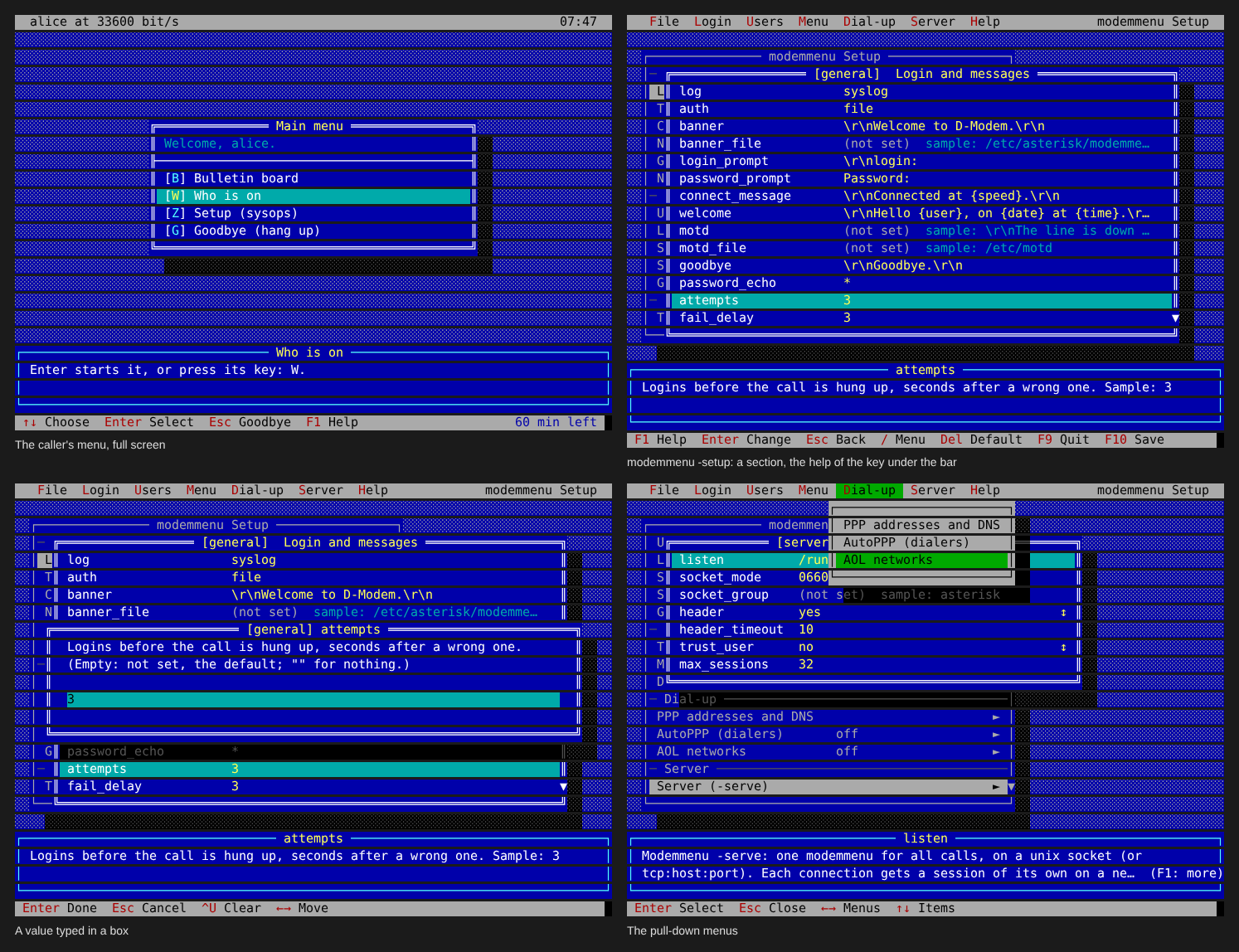
|
||||
|
||||
@@ -12,73 +15,91 @@ a bar at the foot.
|
||||
modemmenu -setup -config /etc/asterisk/modemmenu.conf
|
||||
```
|
||||
|
||||
- The first window has every section, under Login, Users, Menu,
|
||||
Dial-up and Server (the same as the bar's menus). Enter opens one: its
|
||||
keys and their values, `(not set)` and the sample's value for those the
|
||||
file leaves out.
|
||||
- Every section and key has a line under the bar saying what it does,
|
||||
written for the sysop; **F1** adds the sample's own notes and the values
|
||||
it can be picked from.
|
||||
- **Enter** changes the value under the bar: typed in a box (cursor keys,
|
||||
Home, End, Del, ^U), or picked from a list (a `↕` at the right of the
|
||||
line). **Space** steps through the choices; **Del** takes the key out
|
||||
(its default again). An empty box is "not set"; type `""` for an empty
|
||||
value.
|
||||
- `[item NAME]` and `[number NAME]` are lists: add one, open it, rename
|
||||
it or delete it. An item renamed or deleted is renamed or taken out of
|
||||
`[menu] items` too. `[groups]` takes groups of the sysop's own names.
|
||||
- **Add a menu item** starts from one of the sample's items (the BBS by
|
||||
rlogin or by handoff, PPP, change password, last callers, a door, a
|
||||
shell, ZMODEM...) or an empty one. Its keys are filled in, it goes on
|
||||
`[menu] items`, and when the sample's key is taken by another item it
|
||||
gets a free one.
|
||||
- The first window shows all sections, under Login, Users, Menu,
|
||||
Dial-up and Server. These are the same as the menus of the bar.
|
||||
**Enter** opens a section. The section shows its keys and their values.
|
||||
If the file does not have a key, the section shows `(not set)` and the
|
||||
value from the sample.
|
||||
- Each section and key has a line under the bar that tells the sysop
|
||||
what it does. **F1** adds the notes from the sample and the values that
|
||||
you can select.
|
||||
- **Enter** changes the value under the bar. You type the value in a box
|
||||
(cursor keys, Home, End, Del, ^U), or you select it from a list. A `↕`
|
||||
at the right of the line shows a list. **Space** moves to the next
|
||||
choice. **Del** removes the key, and the key gets its default value
|
||||
again. An empty box means "not set". For an empty value, type `""`.
|
||||
- `[item NAME]` and `[number NAME]` are lists. You can add, open, rename
|
||||
or delete an entry. If you rename or delete an item, the setup also
|
||||
renames it in `[menu] items` or removes it from `[menu] items`.
|
||||
`[groups]` accepts groups with names that the sysop selects.
|
||||
- **Add a menu item** starts from one of the items in the sample, or
|
||||
from an empty item. The sample has these items, and other items: the
|
||||
BBS by rlogin or by handoff, PPP, change password, last callers, a
|
||||
door, a shell and ZMODEM. The setup fills in the keys of the item and
|
||||
adds the item to `[menu] items`. If a different item uses the key of
|
||||
the sample, the setup gives the new item a free key.
|
||||
|
||||
### Values picked from what there is
|
||||
|
||||
Most keys are picked from a list rather than typed, each value with a
|
||||
note of what it is. Some lists are the only values a key takes (`mode`,
|
||||
`tty`, `after`, `charset`, `petscii`, `driver`, `hash`, `emulation`,
|
||||
`comm_type`, `fullscreen`, `password_change`, every `yes`/`no`); the
|
||||
rest are suggestions, with "Type another value…" for one's own. Lists of
|
||||
several values have checkboxes (Space checks one, Enter is done):
|
||||
For most keys, you select the value from a list. You do not type it.
|
||||
Each value in the list has a note that tells what it is. For some keys,
|
||||
the list has the only values that the key accepts. These keys are
|
||||
`mode`, `tty`, `after`, `charset`, `petscii`, `driver`, `hash`,
|
||||
`emulation`, `comm_type`, `fullscreen`, `password_change` and all
|
||||
`yes`/`no` keys. For the other keys, the list has suggestions. To type
|
||||
your own value, select "Type another value…". A list for more than one
|
||||
value has checkboxes. **Space** selects a checkbox, and **Enter**
|
||||
completes the list:
|
||||
|
||||
| Key | Offered |
|
||||
|---|---|
|
||||
| `[general] auth` | file, ldap, sql, system, checked in the order they are asked |
|
||||
| `[general] auth` | file, ldap, sql, system, checked in the sequence that you select |
|
||||
| `[menu] items` | each `[item]` with its label and mode, in the menu's order |
|
||||
| `[item] key` | the letters of the item's name and label, each "free" or "taken by [item x]" / "the hangup" |
|
||||
| `[item] users`, `[number] user` | the users file's users |
|
||||
| `[item] groups`, `[system] groups` | `[groups]`' groups with their members, and the system's groups |
|
||||
| `[item] run_as`, `[authd] allow_users` | `{user}`, and the system's login accounts |
|
||||
| `[item] key` | the letters of the name and label of the item, each marked "free" or "taken by [item x]" / "the hangup" |
|
||||
| `[item] users`, `[number] user` | the users in the users file |
|
||||
| `[item] groups`, `[system] groups` | the groups in `[groups]` with their members, and the groups of the system |
|
||||
| `[item] run_as`, `[authd] allow_users` | `{user}`, and the login accounts of the system |
|
||||
| `[item] dropfile` | door32.sys, door.sys, dorinfo1.def, dorinfo#.def |
|
||||
| `[item] path` | the sockets in /run/modemmenu and /run/bbs |
|
||||
| `[autoppp] item`, `[number] item` | the menu's items |
|
||||
| `[server]`/`[authd] listen` | the usual socket, marked "taken by" when the other uses it |
|
||||
| `socket_group`, `socket_mode` | the system's groups; 0660, 0600, 0666 |
|
||||
| `[ppp_pool] dns` | this server's PPP address, resolv.conf's servers, Cloudflare, Google, Quad9 |
|
||||
| `[autoppp] item`, `[number] item` | the items of the menu |
|
||||
| `[server]`/`[authd] listen` | the usual socket, marked "taken by" if the other section uses it |
|
||||
| `socket_group`, `socket_mode` | the groups of the system, and 0660, 0600, 0666 |
|
||||
| `[ppp_pool] dns` | the PPP address of this server, the servers in resolv.conf, Cloudflare, Google, Quad9 |
|
||||
| `[aol] networks` | aolnet, sprintnet, tymnet, p3 |
|
||||
| time limits, `time_warning`, `min_baud`, `rate`, `security`, `log`... | common values |
|
||||
|
||||
- **F1** shows the whole help of the line, **/** (or F12, or Alt and a
|
||||
letter) the menus, **Esc** goes back a window, **F10** saves, **F9**
|
||||
quits (asking to save what changed). `^L` draws the screen again.
|
||||
- The descriptions are built into the program; the sample's notes are
|
||||
those of the [reference](reference.md).
|
||||
- These keys are available:
|
||||
- **F1** shows all the help for the line.
|
||||
- **/** (or F12, or Alt and a letter) shows the menus.
|
||||
- **Esc** goes back one window.
|
||||
- **F10** saves.
|
||||
- **F9** quits. If there are changes, it asks if you want to save them.
|
||||
- `^L` draws the screen again.
|
||||
- The descriptions are part of the program. The notes from the sample
|
||||
are the same as the notes in the [reference](reference.md).
|
||||
|
||||
Saving checks the file first, as `modemmenu -check` does; a file that
|
||||
does not check is saved only when asked again ("Save anyway"). The file
|
||||
keeps its comments, blank lines and order: a changed key is changed on
|
||||
its own line (a comment after it kept), a new key goes after the last of
|
||||
its section, a new section at the end. The file is written beside the
|
||||
old one and renamed over it, its mode and owner kept. Each call reads
|
||||
the file anew, so the next call has the changes; `[server]` is read when
|
||||
`modemmenu -serve` starts.
|
||||
Before the setup saves the file, it checks the file, as
|
||||
`modemmenu -check` does. If the check fails, the setup saves the file
|
||||
only when you ask again ("Save anyway").
|
||||
|
||||
With no file yet, the setup starts from the sample and saves it there.
|
||||
The file keeps its comments, blank lines and sequence:
|
||||
|
||||
- The setup changes a changed key on its own line. It keeps a comment
|
||||
after the key.
|
||||
- The setup adds a new key after the last key of its section.
|
||||
- The setup adds a new section at the end.
|
||||
|
||||
The setup writes the new file next to the old file. Then it renames the
|
||||
new file to the name of the old file, and keeps the mode and the owner.
|
||||
Each call reads the file again, thus the next call gets the changes.
|
||||
modemmenu reads `[server]` when `modemmenu -serve` starts.
|
||||
|
||||
If there is no file, the setup starts from the sample and saves the
|
||||
result at the path of the file.
|
||||
|
||||
## On the line
|
||||
|
||||
A sysop who calls in can have the setup on the menu, as an item of
|
||||
A sysop who calls in can get the setup from the menu, as an item with
|
||||
`mode = setup`:
|
||||
|
||||
```ini
|
||||
@@ -89,23 +110,33 @@ mode = setup
|
||||
groups = sysops
|
||||
```
|
||||
|
||||
It must have `users` or `groups` (modemmenu refuses one without), and is
|
||||
never a guest's. It needs an ANSI terminal of 40x14 at least (80x24 is
|
||||
better); others are told so. The idle timeout does not hold in it: the
|
||||
setup waits for the sysop however long they take. The call's time limit
|
||||
(`time_limit`) still does, and what was not saved when the call ends is
|
||||
lost. The file is
|
||||
written as the user modemmenu runs as, which must be able to write it.
|
||||
The item must have `users` or `groups`. modemmenu refuses the item
|
||||
without them. A guest can never get this item. The item must have an
|
||||
ANSI terminal of a minimum of 40x14 (80x24 is better). On other
|
||||
terminals, modemmenu tells the caller that the terminal is not
|
||||
applicable.
|
||||
|
||||
The idle timeout does not apply to the setup. The setup waits for the
|
||||
sysop for an unlimited time. But the time limit of the call
|
||||
(`time_limit`) applies. When the call ends, changes that you did not save
|
||||
are lost. modemmenu writes the file as the user that it runs as. That
|
||||
user must be able to write the file.
|
||||
|
||||
## Terminals
|
||||
|
||||
The screens are drawn in UTF-8 where the terminal shows it, in code page
|
||||
437 for SyncTERM and the ANSI terminals of BBSs, in a VT's line-drawing
|
||||
set (`ESC ( 0`) for a VT or xterm without UTF-8, and in ASCII when told
|
||||
(`[terminal] charset`). A DEC terminal itself (no colors) gets bold and
|
||||
reverse for the colors. Only the cells that change are sent: moving
|
||||
the bar costs a hundred bytes or two. At the console, `-setup` takes
|
||||
UTF-8 from the locale (`LANG`), else the VT set for `TERM=vt*` or
|
||||
`xterm*`, code page 437 for `TERM=linux` or `ansi`.
|
||||
The setup draws the screens with one of these character sets:
|
||||
|
||||
- UTF-8, if the terminal can show it.
|
||||
- Code page 437, for SyncTERM and the ANSI terminals of BBSs.
|
||||
- The line-drawing set of a VT (`ESC ( 0`), for a VT or xterm without
|
||||
UTF-8.
|
||||
- ASCII, if the configuration tells it to (`[terminal] charset`).
|
||||
|
||||
A real DEC terminal (no colors) gets bold and reverse in place of the
|
||||
colors. The setup sends only the cells that change. A movement of the bar
|
||||
uses one or two hundred bytes. At the console, `-setup` gets UTF-8 from
|
||||
the locale (`LANG`). If the locale does not give UTF-8, it uses the VT
|
||||
set for `TERM=vt*` or `xterm*`, and code page 437 for `TERM=linux` or
|
||||
`ansi`.
|
||||
|
||||
**See also:** [Configuration](configuration.md#the-full-screen-menu)
|
||||
+69
-43
@@ -1,49 +1,75 @@
|
||||
# Tests
|
||||
|
||||
|
||||
`make test` checks the password schemes, the file and SQLite backends,
|
||||
the menu's choices and the telnet client, and runs modemmenu on a pty as
|
||||
app_dmodem does: a wrong and a right login, the message of the day,
|
||||
choices by key, name and alias, an unknown choice and `?`, an rlogin BBS
|
||||
and back to the menu, a cooked shell, and an exec selection's
|
||||
environment and session file. It also runs `modemmenu -serve` on a unix
|
||||
socket: a session from an app_dmodem header (on a pty of its own), a
|
||||
caller hanging up, another modemmenu handing a logged-in caller over by
|
||||
a `mode = unix` item, and `SIGTERM`. Drop files are tested line by line in all three formats
|
||||
(Synchronet's defaults, the other settings, the 31-line `DOOR.SYS`,
|
||||
names split for `DORINFO1.DEF`) and on a call (the files, their names,
|
||||
the node, the environment, the clean-up). Calls test who sees what (users,
|
||||
groups, `min_baud`, caller ID), a guest, signups (logged in at once, and
|
||||
pending), refused and known numbers, and a selection hung up at the
|
||||
day's limit, then the day's next call refused. Password changes are
|
||||
tested in the users file (other lines and notes kept) and in SQLite, and
|
||||
on a call: a wrong current password, the rules for the new one, the
|
||||
change, the next login with it, and a guest. The auth socket is
|
||||
tested: right and wrong passwords, unknown, malformed and locked users,
|
||||
`allow_users` and its settings. AutoPPP is tested with the real
|
||||
`modemmenu.so` loaded by a stand-in for pppd ([pppd/test/host.c](../pppd/test/host.c),
|
||||
exporting what pppd exports to plugins; this needs a C compiler and
|
||||
`ppp-dev`): PPP frames told from names, PAP logins right and wrong,
|
||||
`maxconnect` from the time limit, the access item, `attempts`, one login
|
||||
a call, and on a call a dialer's frame at the login prompt reaching
|
||||
pppd's plugin through the call's socket. A real pppd needs a kernel
|
||||
with PPP (`ppp_generic`). The time warnings are tested on a call
|
||||
(two, the longer first, and none with `time_warning = no`), the last callers list
|
||||
(kept to 200, the newest first, no caller ID) on two calls, and Active
|
||||
Directory's password encoding. The connect rate is tested as `{speed}` (the same both ways, apart, not
|
||||
known) and on calls (after the banner, left out without a rate, its own
|
||||
text, off). The system backend's uid, root and
|
||||
group rules are tested with PAM replaced.
|
||||
`make test` does the checks that follow.
|
||||
|
||||
Two more tests run when their servers are given:
|
||||
- It checks the password schemes, the file and SQLite backends, the
|
||||
menu choices and the telnet client.
|
||||
- It runs modemmenu on a pty, as app_dmodem does. On the pty, it tests
|
||||
these items: a wrong login and a correct login, the message of the
|
||||
day, choices by key, by name and by alias, an unknown choice and `?`,
|
||||
an rlogin BBS and the return to the menu, a cooked shell, and the
|
||||
environment and session file of an exec selection.
|
||||
- It runs `modemmenu -serve` on a unix socket. It tests these items: a
|
||||
session from an app_dmodem header (on a different pty), a caller who
|
||||
hangs up, a transfer of a logged-in caller from a different modemmenu
|
||||
through a `mode = unix` item, and `SIGTERM`.
|
||||
- It tests drop files line by line in all three formats. The tests
|
||||
include the defaults of Synchronet, the other settings, the 31-line
|
||||
`DOOR.SYS`, and names that are split for `DORINFO1.DEF`. It also tests
|
||||
drop files on a call: the files, their names, the node, the
|
||||
environment and the removal of the files after the call.
|
||||
- Calls test which items each caller can see (users, groups,
|
||||
`min_baud`, caller ID). Calls also test a guest, signups (logged in
|
||||
immediately, and pending), refused numbers and known numbers. They
|
||||
also test a selection that modemmenu hangs up at the daily limit, and
|
||||
the next call of that day, which modemmenu refuses.
|
||||
- It tests password changes in the users file and in SQLite. In the
|
||||
users file, the other lines and notes must stay. On a call, it tests a
|
||||
wrong current password, the rules for the new password, the change,
|
||||
the next login with the new password, and a guest.
|
||||
- It tests the auth socket: correct and wrong passwords, unknown,
|
||||
malformed and locked users, `allow_users` and its settings.
|
||||
- It tests AutoPPP with the real `modemmenu.so`. A stand-in for pppd
|
||||
loads the plugin ([pppd/test/host.c](../pppd/test/host.c)). The
|
||||
stand-in exports the same items that pppd exports to plugins. This
|
||||
test must have a C compiler and `ppp-dev`. The test examines these
|
||||
items:
|
||||
- PPP frames, which modemmenu must tell apart from names.
|
||||
- Correct and wrong PAP logins.
|
||||
- `maxconnect` from the time limit.
|
||||
- The access item, `attempts`, and one login for each call.
|
||||
- On a call, a frame from a dialer at the login prompt. The frame must
|
||||
get to the pppd plugin through the socket of the call.
|
||||
|
||||
A real pppd must have a kernel with PPP (`ppp_generic`).
|
||||
- It tests the time warnings on a call. There must be two warnings, with
|
||||
the longer warning first. With `time_warning = no`, there must be no
|
||||
warning.
|
||||
- It tests the list of the last callers on two calls. The list keeps a
|
||||
maximum of 200 callers, shows the newest caller first and shows no
|
||||
caller ID.
|
||||
- It tests the password encoding of Active Directory.
|
||||
- It tests the connect rate as `{speed}`: the same rate in the two
|
||||
directions, different rates, and an unknown rate. It also tests the
|
||||
connect rate on calls: after the banner, removed when there is no
|
||||
rate, its own text, and disabled.
|
||||
- It tests the uid, root and group rules of the system backend, with a
|
||||
replacement for PAM.
|
||||
|
||||
Two more tests run if you give them their servers:
|
||||
|
||||
- `MODEMMENU_TEST_PAM=user:password make test`, as root with
|
||||
`/etc/pam.d/modemmenu`: PAM against a real account, and its password
|
||||
changed and back (the service needs a password stack).
|
||||
- `MODEMMENU_TEST_LDAP=ldap://host:port make test`: the LDAP backend,
|
||||
against a server with `uid=lduser,ou=people,dc=example,dc=com`
|
||||
(password `ldpass`), and that password changed and back (the server
|
||||
must let users write their own `userPassword`); with
|
||||
`ou=groups,dc=example,dc=com` holding `cn=sysops` (`groupOfNames`,
|
||||
`member` lduser), `cn=dialup` (`posixGroup`, `memberUid` lduser) and
|
||||
`cn=other` (without), LDAP groups too.
|
||||
`/etc/pam.d/modemmenu`: this tests PAM against a real account. It
|
||||
changes the password of the account and then changes it back. The
|
||||
service must have a password stack.
|
||||
- `MODEMMENU_TEST_LDAP=ldap://host:port make test`: this tests the LDAP
|
||||
backend against a server that has
|
||||
`uid=lduser,ou=people,dc=example,dc=com` (password `ldpass`). It
|
||||
changes that password and then changes it back. The server must let
|
||||
users write their own `userPassword`. If
|
||||
`ou=groups,dc=example,dc=com` contains the groups that follow, the
|
||||
test also examines LDAP groups:
|
||||
- `cn=sysops` (`groupOfNames`, `member` lduser)
|
||||
- `cn=dialup` (`posixGroup`, `memberUid` lduser)
|
||||
- `cn=other` (without lduser)
|
||||
+73
-65
@@ -1,19 +1,21 @@
|
||||
# modemmenu on FreePBX
|
||||
|
||||
A ready-made setup for [FreePBX](https://www.freepbx.org/) 16 and 17:
|
||||
callers dial in, their modem connects to
|
||||
[D-Modem](https://github.com/D-Modem/D-Modem), and modemmenu asks for a
|
||||
user name and password from a text file before showing its menu.
|
||||
This is a configuration for [FreePBX](https://www.freepbx.org/) 16 and
|
||||
17 that is ready to use. Callers dial in, and their modem connects to
|
||||
[D-Modem](https://github.com/D-Modem/D-Modem). Then modemmenu asks for a
|
||||
user name and a password and checks them against a text file. Then it
|
||||
shows its menu.
|
||||
|
||||
| file | goes to | |
|
||||
|---|---|---|
|
||||
| [modemmenu.conf](modemmenu.conf) | `/etc/modemmenu/modemmenu.conf` | the login and the menu |
|
||||
| [modemmenu.users](modemmenu.users) | `/etc/modemmenu/modemmenu.users` | the callers' names and passwords |
|
||||
| [modemmenu.service](modemmenu.service) | `/etc/systemd/system/modemmenu.service` | runs modemmenu for every call |
|
||||
| [modemmenu.users](modemmenu.users) | `/etc/modemmenu/modemmenu.users` | the names and passwords of the callers |
|
||||
| [modemmenu.service](modemmenu.service) | `/etc/systemd/system/modemmenu.service` | runs modemmenu for all calls |
|
||||
| [extensions_custom.conf](extensions_custom.conf) | add to `/etc/asterisk/extensions_custom.conf` | an optional test extension |
|
||||
|
||||
The files live in `/etc/modemmenu`, not `/etc/asterisk`, so that FreePBX's
|
||||
`fwconsole chown` never opens the users file to the asterisk user.
|
||||
The files are in `/etc/modemmenu`, not in `/etc/asterisk`. Thus the
|
||||
`fwconsole chown` of FreePBX never gives the asterisk user access to the
|
||||
users file.
|
||||
|
||||
## How a call goes
|
||||
|
||||
@@ -26,28 +28,29 @@ caller's modem ──SIP──▶ FreePBX inbound route ──▶ D-Modem: menu
|
||||
──▶ menu: PPP, last callers, password
|
||||
```
|
||||
|
||||
One `modemmenu -serve` answers every call on
|
||||
`/run/modemmenu/modemmenu.sock`. The socket belongs to the asterisk
|
||||
group, so Asterisk and dmodem-ari can connect and other users cannot.
|
||||
Each call gets a session of its own.
|
||||
One `modemmenu -serve` answers all calls on
|
||||
`/run/modemmenu/modemmenu.sock`. The socket belongs to the asterisk
|
||||
group. Thus Asterisk and dmodem-ari can connect, and other users cannot.
|
||||
Each call gets its own session.
|
||||
|
||||
## Setting it up
|
||||
|
||||
This assumes D-Modem's FreePBX module is installed, with dmodem-ari or
|
||||
app_dmodem, as in D-Modem's
|
||||
[docs/freepbx.md](https://github.com/D-Modem/D-Modem/blob/main/docs/freepbx.md).
|
||||
Before you start, install the FreePBX module of D-Modem, with
|
||||
dmodem-ari or app_dmodem. Refer to
|
||||
[docs/freepbx.md](https://github.com/D-Modem/D-Modem/blob/main/docs/freepbx.md)
|
||||
of D-Modem.
|
||||
|
||||
1. **Build modemmenu.** It needs Go 1.22 or later; Debian 12 (FreePBX
|
||||
17) ships Go 1.19, so build it on another machine or use
|
||||
bookworm-backports. This setup does not use PAM, so a static build
|
||||
copies to any x86-64 Linux:
|
||||
1. **Build modemmenu.** It must have Go 1.22 or later. Debian 12
|
||||
(FreePBX 17) has Go 1.19. Thus, build modemmenu on a different
|
||||
machine, or use bookworm-backports. This configuration does not use
|
||||
PAM. Thus you can copy a static build to any x86-64 Linux:
|
||||
|
||||
CGO_ENABLED=0 make PAM=0
|
||||
scp modemmenu root@freepbx:/usr/local/bin/
|
||||
|
||||
Or on the FreePBX machine itself: `make PAM=0 install-freepbx`,
|
||||
which also does steps 2 and 3 without overwriting files that are
|
||||
already there.
|
||||
Alternatively, on the FreePBX machine, run
|
||||
`make PAM=0 install-freepbx`. This command also does steps 2 and 3.
|
||||
It does not overwrite files that are already there.
|
||||
|
||||
2. **Install the files** (as root):
|
||||
|
||||
@@ -56,16 +59,17 @@ app_dmodem, as in D-Modem's
|
||||
install -m 600 freepbx/modemmenu.users /etc/modemmenu/
|
||||
install -m 644 freepbx/modemmenu.service /etc/systemd/system/
|
||||
|
||||
3. **Add the callers.** `modemmenu -hash` asks for a password and prints
|
||||
its bcrypt hash; each caller is a `name:hash` line in
|
||||
3. **Add the callers.** `modemmenu -hash` asks for a password and
|
||||
prints its bcrypt hash. Each caller is a `name:hash` line in
|
||||
`/etc/modemmenu/modemmenu.users`:
|
||||
|
||||
echo "alice:$(modemmenu -hash)" >> /etc/modemmenu/modemmenu.users
|
||||
|
||||
For a first test, `test:{PLAIN}changeme` will do; take it out after.
|
||||
The file is read at each login, so changes need no restart.
|
||||
For a first test, you can use `test:{PLAIN}changeme`. Remove it
|
||||
after the test. modemmenu reads the file at each login. Thus you do
|
||||
not have to restart after a change.
|
||||
|
||||
4. **Check and start it:**
|
||||
4. **Check and start modemmenu:**
|
||||
|
||||
modemmenu -check -config /etc/modemmenu/modemmenu.conf
|
||||
systemctl daemon-reload
|
||||
@@ -81,53 +85,57 @@ app_dmodem, as in D-Modem's
|
||||
| Socket | `/run/modemmenu/modemmenu.sock` |
|
||||
| Call details first | on |
|
||||
|
||||
Leave the rest at their defaults. This writes a `[menu]` profile with
|
||||
`mode = unix` and `header = yes` into `/etc/asterisk/dmodem.conf`, and
|
||||
the destination `app-dmodem,menu,1`.
|
||||
Keep the default values for the other fields. This step writes a
|
||||
`[menu]` profile with `mode = unix` and `header = yes` into
|
||||
`/etc/asterisk/dmodem.conf`. It also adds the destination
|
||||
`app-dmodem,menu,1`.
|
||||
|
||||
6. **Send calls to it.** In **Connectivity > Inbound Routes**, pick
|
||||
**D-Modem: menu** as the destination of the modem line's DID. Click
|
||||
**Apply Config**. With dmodem-ari, restart it so that it reads the new
|
||||
profile.
|
||||
6. **Send calls to the profile.** In **Connectivity > Inbound Routes**,
|
||||
select **D-Modem: menu** as the destination of the DID of the modem
|
||||
line. Click **Apply Config**. If you use dmodem-ari, restart it. Then
|
||||
it reads the new profile.
|
||||
|
||||
7. **Test it** (optional). Add [extensions_custom.conf](extensions_custom.conf)'s
|
||||
lines to `/etc/asterisk/extensions_custom.conf` and run
|
||||
`fwconsole reload`: a modem on one of your extensions (an ATA) dialling
|
||||
`6368` reaches the menu without going through the trunk.
|
||||
7. **Test the configuration** (optional). Add the lines of
|
||||
[extensions_custom.conf](extensions_custom.conf) to
|
||||
`/etc/asterisk/extensions_custom.conf`. Then run `fwconsole reload`.
|
||||
A modem on one of your extensions (an ATA) can then dial `6368`. The
|
||||
call gets to the menu and does not go through the trunk.
|
||||
|
||||
Keep the trunk and the extension to one codec (ulaw or alaw), with fax
|
||||
detection off; D-Modem's line check page lists what is still in the way.
|
||||
Limit the trunk and the extension to one codec (ulaw or alaw), and
|
||||
disable fax detection. The line check page of D-Modem lists the
|
||||
problems that remain.
|
||||
|
||||
## The menu
|
||||
|
||||
- **PPP**: dial-up networking. `apt install ppp` first. Each caller
|
||||
gets an address of `[ppp_pool]` (100.120.224.10 to 100.120.255.254, the server is
|
||||
100.120.224.1). For DNS, the internet and keeping callers off your LAN,
|
||||
- **PPP**: dial-up networking. First, run `apt install ppp`. Each
|
||||
caller gets an address from `[ppp_pool]` (100.120.224.10 to
|
||||
100.120.255.254). The server is 100.120.224.1. For DNS, for the
|
||||
internet and to keep callers away from your LAN, run
|
||||
`make install-dialup` ([the dial-up network](../docs/dialup-network.md)).
|
||||
Windows' Dial-Up Networking logs in
|
||||
with PAP instead of at the prompt: turn on `[autoppp]` and install
|
||||
pppd's `modemmenu.so` plugin (`make` builds it when `ppp-dev` is
|
||||
installed).
|
||||
- **Last callers**, and **Change your password**, which rewrites the
|
||||
caller's line in the users file.
|
||||
- **Bulletin board** (off until you add `bbs` to `[menu] items`):
|
||||
[D-Modem's BBS](https://github.com/D-Modem/bbs) on its unix socket,
|
||||
taking the caller as logged in.
|
||||
Dial-Up Networking of Windows logs in with PAP, not at the prompt. For
|
||||
Windows, enable `[autoppp]` and install the `modemmenu.so` plugin of
|
||||
pppd. If `ppp-dev` is installed, `make` builds the plugin.
|
||||
- **Last callers**, and **Change your password**. **Change your
|
||||
password** writes the line of the caller in the users file again.
|
||||
- **Bulletin board** (disabled until you add `bbs` to `[menu] items`):
|
||||
[D-Modem's BBS](https://github.com/D-Modem/bbs) on its unix socket.
|
||||
The BBS accepts the caller as logged in.
|
||||
|
||||
Each call may last an hour and each user two hours a day
|
||||
(`time_limit`, `daily_limit`); the menu prompt shows the minutes left.
|
||||
To let callers make their own accounts, set `[signup] enabled = yes`:
|
||||
"new" at the login prompt adds a locked line to the users file, which
|
||||
you unlock by removing its `!`.
|
||||
Each call can continue for a maximum of one hour, and each user for a
|
||||
maximum of two hours each day (`time_limit`, `daily_limit`). The menu
|
||||
prompt shows the minutes that remain. To let callers make their own
|
||||
accounts, set `[signup] enabled = yes`. Then "new" at the login prompt
|
||||
adds a locked line to the users file. To unlock the line, remove its
|
||||
`!`.
|
||||
|
||||
## When it does not work
|
||||
|
||||
- `journalctl -t modemmenu` shows each call, login and selection.
|
||||
- "The lines are busy" or no menu: is `modemmenu.service` running, and is
|
||||
the socket's group `asterisk`? Asterisk must be in that group (it is
|
||||
on FreePBX).
|
||||
- No rate or caller ID on the screen: turn on **Call details first** in
|
||||
the profile.
|
||||
- With dmodem-ari, the dialed number modemmenu sees is the profile's
|
||||
name (`menu`), not the DID, because FreePBX reaches it through the
|
||||
`app-dmodem` context.
|
||||
- If you see "The lines are busy", or if there is no menu: make sure
|
||||
that `modemmenu.service` runs, and that the group of the socket is
|
||||
`asterisk`. Asterisk must be in that group (on FreePBX, it is).
|
||||
- If the screen shows no rate or caller ID: enable **Call details
|
||||
first** in the profile.
|
||||
- With dmodem-ari, the dialed number that modemmenu sees is the name of
|
||||
the profile (`menu`), not the DID. The cause is that FreePBX gets to
|
||||
it through the `app-dmodem` context.
|
||||
Reference in new issue
Block a user