 Claude
58ffd61645
As bbs config got in D-Modem/bbs#57:

- Every section and key has a description of what it does for the
  sysop (setupdesc.go); TestEverySettingDescribed keeps one for each
  key the sample has.  F1 adds the sample's notes and the choices.
- Keys are picked from lists with a note per value: closed lists (mode,
  tty, after, charset, driver, hash...), suggestions with "Type another
  value…", and checkboxes for lists of several (auth, [menu] items,
  dropfile, users, groups, aol networks, ppp_pool dns).  The values come
  from the file and the machine: the items, the users file, [groups],
  /etc/passwd and /etc/group, resolv.conf, the sockets in /run.
- An item's key list says which letters are free and which are taken by
  another item or the hangup; listen addresses say when the other
  section uses them.
- "Add a menu item" starts from one of the sample's items (or an empty
  one), with a free key if the sample's is taken.
- tui.ChooseMulti: a list of checkboxes.
- The sample gains [number] deny and [sql] timeout, which the code read.

Co-Authored-By: Claude Opus 5.5 <noreply@anthropic.com>
Claude-Session: https://claude.ai/code/session_01B82eRVGabTrMWBpbnD6HKF
5.4 KiB
The sysop's setup
modemmenu -setup changes modemmenu.conf on a full screen, as the BBS
setup programs of the 1990s did: a menu bar of pull-down menus, a blue
desk, a window for each section cascading over the one it was opened
from, the help of the line under the bar in a box below, and the keys on
a bar at the foot.
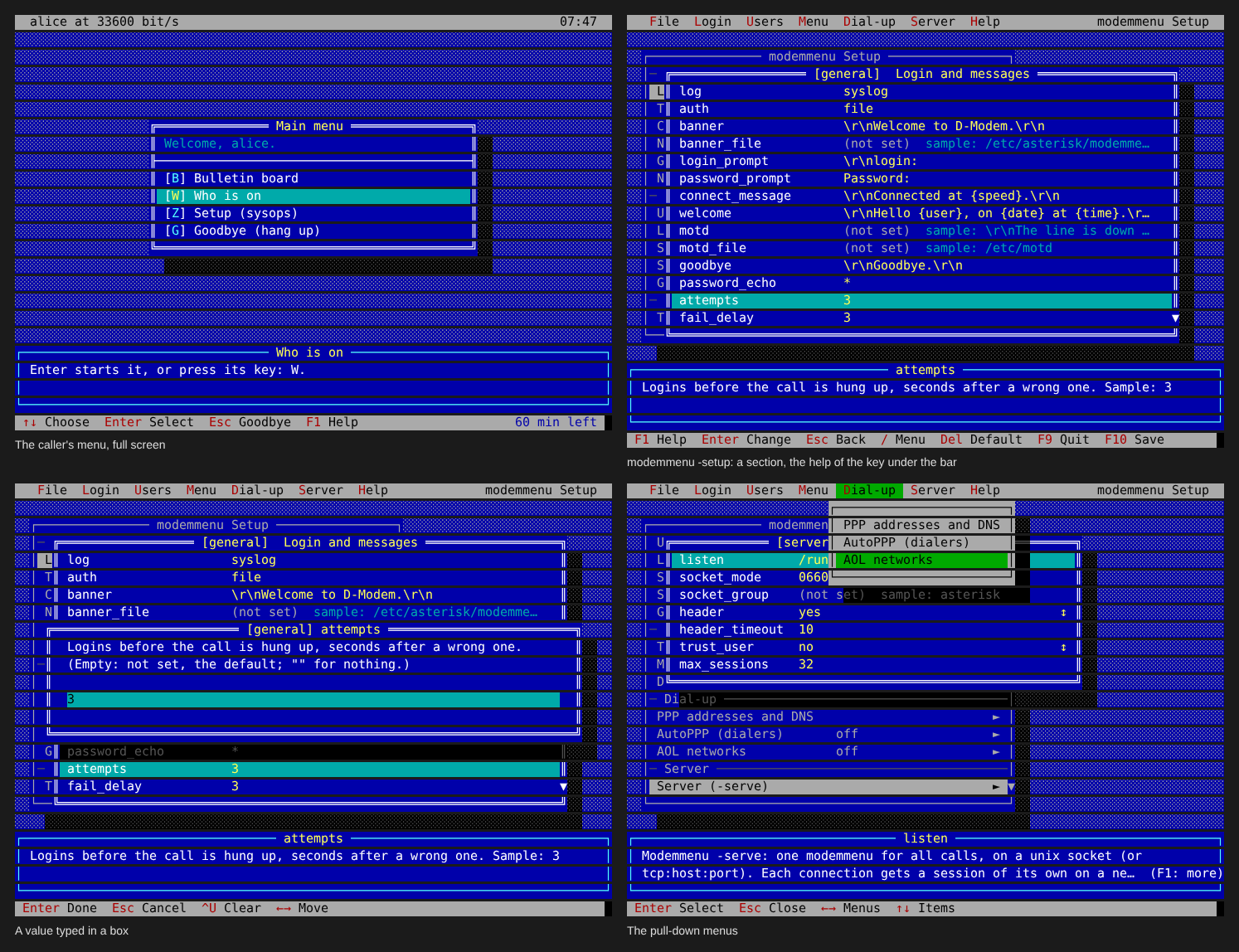
modemmenu -setup -config /etc/asterisk/modemmenu.conf
- The first window has every section, under Login, Users, Menu,
Dial-up and Server (the same as the bar's menus). Enter opens one: its
keys and their values,
(not set)and the sample's value for those the file leaves out. - Every section and key has a line under the bar saying what it does, written for the sysop; F1 adds the sample's own notes and the values it can be picked from.
- Enter changes the value under the bar: typed in a box (cursor keys,
Home, End, Del, ^U), or picked from a list (a
↕at the right of the line). Space steps through the choices; Del takes the key out (its default again). An empty box is "not set"; type""for an empty value. [item NAME]and[number NAME]are lists: add one, open it, rename it or delete it. An item renamed or deleted is renamed or taken out of[menu] itemstoo.[groups]takes groups of the sysop's own names.- Add a menu item starts from one of the sample's items (the BBS by
rlogin or by handoff, PPP, change password, last callers, a door, a
shell, ZMODEM...) or an empty one. Its keys are filled in, it goes on
[menu] items, and when the sample's key is taken by another item it gets a free one.
Values picked from what there is
Most keys are picked from a list rather than typed, each value with a
note of what it is. Some lists are the only values a key takes (mode,
tty, after, charset, petscii, driver, hash, emulation,
comm_type, fullscreen, password_change, every yes/no); the
rest are suggestions, with "Type another value…" for one's own. Lists of
several values have checkboxes (Space checks one, Enter is done):
| Key | Offered |
|---|---|
[general] auth |
file, ldap, sql, system, checked in the order they are asked |
[menu] items |
each [item] with its label and mode, in the menu's order |
[item] key |
the letters of the item's name and label, each "free" or "taken by [item x]" / "the hangup" |
[item] users, [number] user |
the users file's users |
[item] groups, [system] groups |
[groups]' groups with their members, and the system's groups |
[item] run_as, [authd] allow_users |
{user}, and the system's login accounts |
[item] dropfile |
door32.sys, door.sys, dorinfo1.def, dorinfo#.def |
[item] path |
the sockets in /run/modemmenu and /run/bbs |
[autoppp] item, [number] item |
the menu's items |
[server]/[authd] listen |
the usual socket, marked "taken by" when the other uses it |
socket_group, socket_mode |
the system's groups; 0660, 0600, 0666 |
[ppp_pool] dns |
this server's PPP address, resolv.conf's servers, Cloudflare, Google, Quad9 |
[aol] networks |
aolnet, sprintnet, tymnet, p3 |
time limits, time_warning, min_baud, rate, security, log... |
common values |
- F1 shows the whole help of the line, / (or F12, or Alt and a
letter) the menus, Esc goes back a window, F10 saves, F9
quits (asking to save what changed).
^Ldraws the screen again. - The descriptions are built into the program; the sample's notes are those of the reference.
Saving checks the file first, as modemmenu -check does; a file that
does not check is saved only when asked again ("Save anyway"). The file
keeps its comments, blank lines and order: a changed key is changed on
its own line (a comment after it kept), a new key goes after the last of
its section, a new section at the end. The file is written beside the
old one and renamed over it, its mode and owner kept. Each call reads
the file anew, so the next call has the changes; [server] is read when
modemmenu -serve starts.
With no file yet, the setup starts from the sample and saves it there.
On the line
A sysop who calls in can have the setup on the menu, as an item of
mode = setup:
[item setup]
key = Z
label = Setup
mode = setup
groups = sysops
It must have users or groups (modemmenu refuses one without), and is
never a guest's. It needs an ANSI terminal of 40x14 at least (80x24 is
better); others are told so. The idle timeout does not hold in it: the
setup waits for the sysop however long they take. The call's time limit
(time_limit) still does, and what was not saved when the call ends is
lost. The file is
written as the user modemmenu runs as, which must be able to write it.
Terminals
The screens are drawn in UTF-8 where the terminal shows it, in code page
437 for SyncTERM and the ANSI terminals of BBSs, in a VT's line-drawing
set (ESC ( 0) for a VT or xterm without UTF-8, and in ASCII when told
([terminal] charset). A DEC terminal itself (no colors) gets bold and
reverse for the colors. Only the cells that change are sent: moving
the bar costs a hundred bytes or two. At the console, -setup takes
UTF-8 from the locale (LANG), else the VT set for TERM=vt* or
xterm*, code page 437 for TERM=linux or ansi.
See also: Configuration